A successful Scrum team needs more than meetings, a task board, and sprint deadlines. It also needs a clear picture of what it is building, what it plans to finish, and what it has actually delivered. Scrum artifacts make that information visible so the team can decide with better information.
Scrum defines three artifacts: the Product Backlog, the Sprint Backlog, and the Increment. Each one has a different job, and each has a commitment that keeps the team focused and gives it a way to judge progress.
If you are learning Scrum, preparing for a project management certification, or working with an Agile team, these artifacts show how Scrum organizes work and delivers value.
What Are Scrum Artifacts?
Scrum artifacts are the main sources of information about work and value in the Scrum framework. They help the Scrum Team and stakeholders see the current state of the product, the work planned for a Sprint, and the results that meet the team's quality standard.
The Scrum Guide says the artifacts are designed to maximize transparency. When everyone can see and understand the information, the team can inspect progress, spot problems, and change the plan when it needs to.
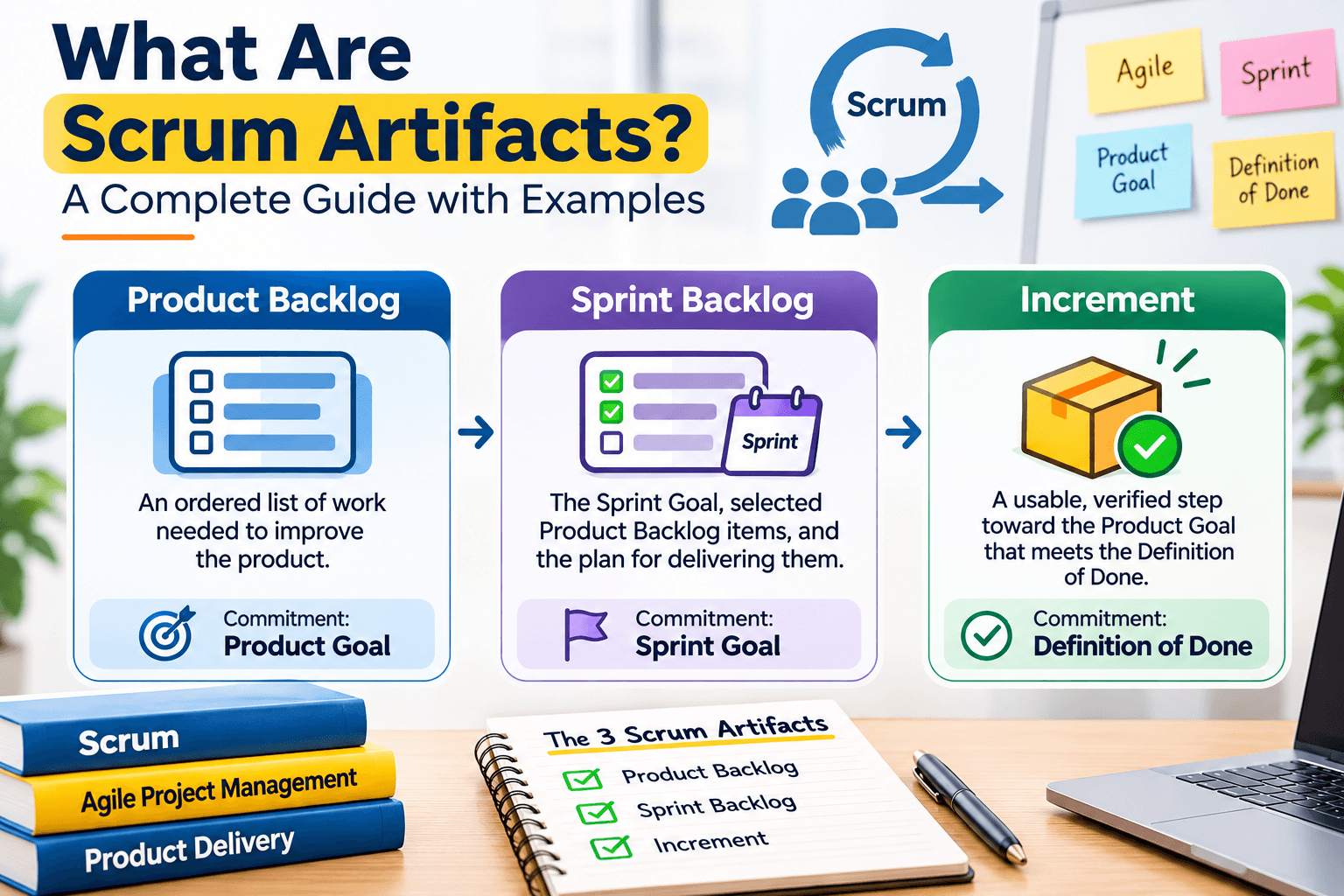
Scrum has three official artifacts:
- Product Backlog: An ordered list of work needed to improve the product.
- Sprint Backlog: The Sprint Goal, selected Product Backlog items, and an actionable plan for delivering the Increment.
- Increment: A usable, verified step toward the Product Goal that meets the Definition of Done.
Each artifact also has a commitment. The commitment gives the team a clear objective and shows what the artifact is meant to achieve.
The Three Scrum Artifacts Explained
1. Product Backlog
The Product Backlog is an ordered list that keeps changing. It holds everything the Scrum Team currently knows is needed to improve the product. It is the single source of work the Scrum Team takes on.
Items can be new features, improvements, bug fixes, technical work, or other activities that add value. The backlog changes as the team learns more about customers, business priorities, and technical needs.
Commitment: Product Goal
The Product Goal describes a future state of the product the Scrum Team is working toward. It gives the Product Backlog a direction and helps the team see why a particular improvement matters.
Imagine a company building an online learning platform. Its Product Goal might be:
Product Goal: Make it easier for students to discover courses, enroll online, and track their learning progress.
To support this goal, the Product Backlog might include:
- Create a student registration and login system.
- Develop a course search and filtering feature.
- Add online course enrollment.
- Build a student learning dashboard.
- Allow students to track course completion.
- Improve the mobile experience.
The Product Owner is accountable for effective Product Backlog management. That includes developing and communicating the Product Goal, creating and clearly communicating Product Backlog items, ordering them, and making sure the backlog is transparent and understood.
What Is Product Backlog Refinement?
Product Backlog refinement is the ongoing work of adding detail, estimates, and order to Product Backlog items. The team may break a large item into smaller, clearer pieces so it can be considered during Sprint Planning.
A broad item such as "Build a student dashboard" could be refined into smaller items: displaying enrolled courses, showing learning progress, and providing access to course materials.
Refinement is not a formal Scrum event. It is ongoing work that keeps the Product Backlog understandable and useful.
2. Sprint Backlog
The Sprint Backlog is a plan created by and for the Developers. It says what the team intends to accomplish in the current Sprint and how it plans to deliver that work.
It is made up of three elements:
- Sprint Goal (Why): The single objective for the Sprint.
- Selected Product Backlog items (What): The work selected for the current Sprint.
- Actionable plan (How): The steps needed to deliver the Increment.
Commitment: Sprint Goal
The Sprint Goal is the single objective that gives the Sprint a purpose. It keeps the team focused on a shared outcome, so the selected tasks are not treated as unrelated jobs.
If the team is building an online learning platform, its Sprint Goal might be:
Sprint Goal: Enable new students to register and securely access their accounts.
The Developers may select Product Backlog items such as:
- Design the registration page.
- Build the registration form.
- Implement account authentication.
- Add form validation and error messages.
- Test the registration and login process.
The Developers update the Sprint Backlog through the Sprint as they learn more about the work. The Sprint Goal stays the commitment. The specific plan can change through discussion with the Product Owner when that is needed.
How Is the Sprint Backlog Used?
The Sprint Backlog is a shared, current picture of the work planned for the Sprint. Developers use it in the Daily Scrum to inspect progress and adjust the plan toward the Sprint Goal.
A digital task board can make that work visible. Columns such as To Do, In Progress, In Review, and Done are a common way to show status. Scrum does not require a specific board layout.
3. Increment
An Increment is a concrete, usable step toward the Product Goal. It includes completed Product Backlog items that meet the Definition of Done, together with the value of all previous Increments.
Each new Increment must work with the previous ones and be thoroughly verified. It should be usable and meet the product's quality standards.
Commitment: Definition of Done
The Definition of Done is a formal description of the state of the Increment when it meets the quality measures required for the product. It creates a shared meaning of what completed work is.
A team building an online learning platform might define a completed registration feature with these criteria:
- The registration form accepts valid student information.
- Required fields are validated.
- Account creation works correctly.
- Security checks have been completed.
- The feature has passed the required tests.
- The functionality meets the team's agreed quality standards.
Only work that meets the Definition of Done is part of the Increment. If a Product Backlog item does not meet it, it cannot be presented as a completed Increment item. It goes back to the Product Backlog for later consideration.
A team can create more than one Increment during a Sprint. An Increment may also be delivered to stakeholders before the Sprint ends. The Sprint Review is not a release gate.
Scrum Artifacts and Their Commitments at a Glance
This table sums up the three Scrum artifacts, what each one is for, and the commitment that goes with it.
| Scrum Artifact | Purpose | Commitment | Key Question |
|---|---|---|---|
| Product Backlog | An ordered list of work needed to improve the product. | Product Goal | What product outcome are we working toward? |
| Sprint Backlog | The Sprint Goal, selected work, and the plan for delivering it. | Sprint Goal | What are we trying to achieve this Sprint, and how? |
| Increment | A usable, verified step toward the Product Goal. | Definition of Done | What work is completed to the required quality standard? |
Practical Example: How Scrum Artifacts Work in a Real Project
Consider a software team building an online learning platform. The team wants to improve the student experience by making course registration easier.
The three artifacts organize that work, from the overall product objective down to the finished functionality.
Step 1: Define the Product Goal
The Product Owner works with the Scrum Team to set the Product Goal: make it easier for students to register, enroll in courses, and access learning materials.
The Product Backlog is then organized around the work needed to move toward that goal. Items may include registration, course search, enrollment, payment, and student dashboards.
Step 2: Create the Sprint Backlog
During Sprint Planning, the Scrum Team talks about the value of the upcoming Sprint and selects suitable Product Backlog items. The Developers create an actionable plan for delivering the selected work.
The Sprint Goal is to enable new students to create accounts and log in securely. The Sprint Backlog includes the registration form, authentication, validation, and testing.
Step 3: Deliver an Increment
During the Sprint, the Developers complete and verify the registration functionality. Once the work meets the Definition of Done, it becomes part of the Increment.
The team can then inspect the result, gather feedback, and decide which improvements to prioritize next.
| Stage | Artifact | Example |
|---|---|---|
| Product direction | Product Backlog | Build an easier online learning experience for students. |
| Sprint planning | Sprint Backlog | Complete student registration and secure login functionality. |
| Completed work | Increment | A tested and usable student registration feature that meets the Definition of Done. |
How Do Scrum Artifacts Work Together?
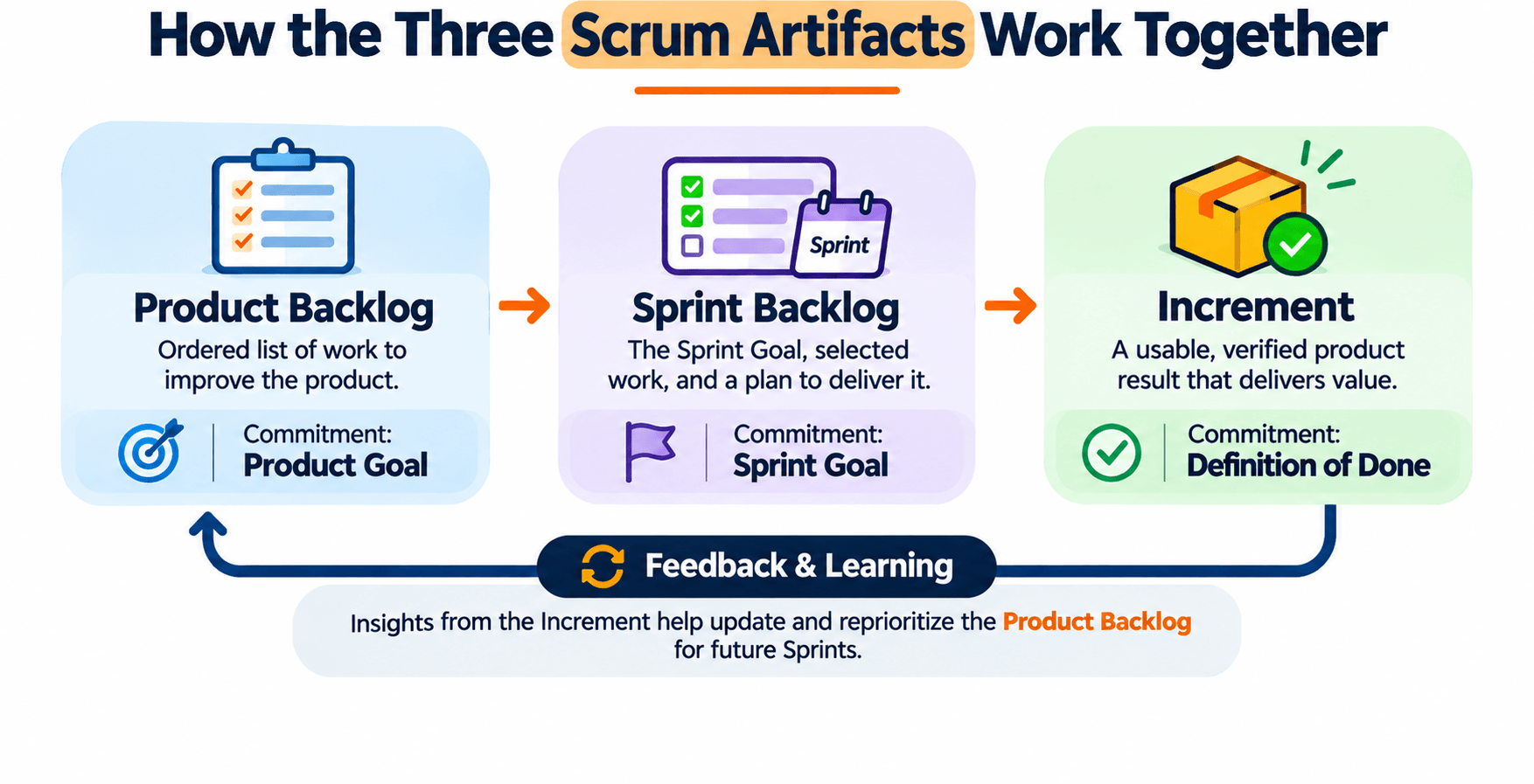
The three artifacts are connected. They show different levels of information, and together they help the Scrum Team stay transparent and focused.
- The Product Backlog provides direction: It contains the ordered work needed to improve the product and is guided by the Product Goal.
- The Sprint Backlog turns priorities into a plan: It identifies the work selected for the Sprint and how the Developers plan to achieve the Sprint Goal.
- The Increment demonstrates completed value: It shows the usable work that meets the Definition of Done and moves the product toward its goal.
Feedback from the Increment and from stakeholders can change the Product Backlog. The team uses that updated information when it plans the next Sprints.
This cycle supports Scrum's three pillars: transparency, inspection, and adaptation. The artifacts make the important information visible. The team regularly inspects the results and adapts the plan.
Scrum Artifacts vs. Scrum Events
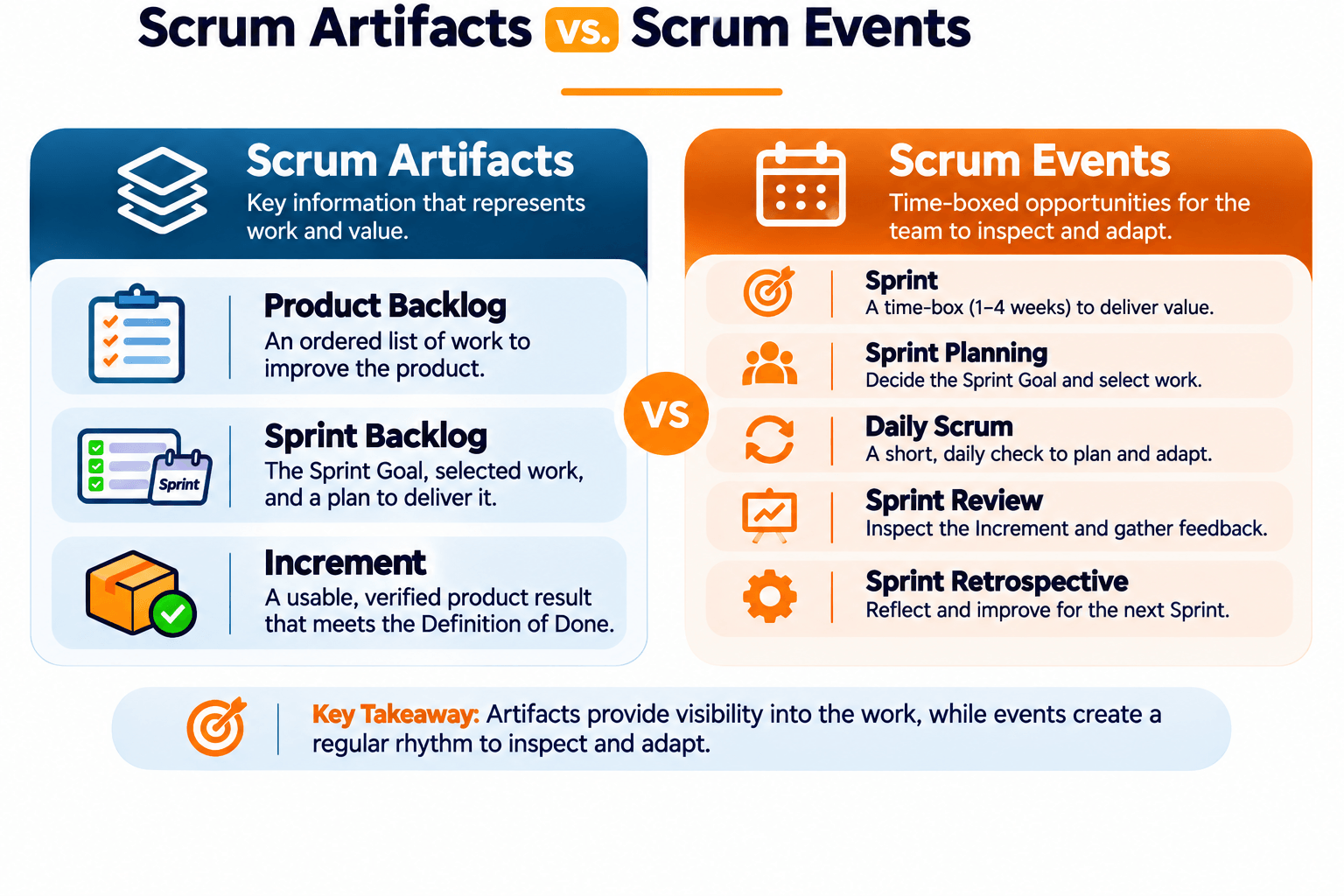
Scrum artifacts and Scrum events are related, and they do different jobs. Artifacts hold important information about work and value. Events give the Scrum Team a set time to inspect that work and adapt it.
| Scrum Artifacts | Scrum Events |
|---|---|
| Product Backlog | Sprint Planning, Product Backlog refinement activity |
| Sprint Backlog | Sprint Planning and Daily Scrum |
| Increment | Sprint Review and ongoing inspection during the Sprint |
Scrum has five formal events: the Sprint, Sprint Planning, Daily Scrum, Sprint Review, and Sprint Retrospective. These events give the team a chance to inspect progress, work together, and adapt its approach.
For a wider look at Agile practice, read WFI's guide to Agile Project Management: Principles, Methods, and Real-World Examples.
Common Mistakes Teams Make When Managing Scrum Artifacts
Scrum artifacts help only when the team keeps them transparent, understandable, and tied to the work. These mistakes weaken them.
1. Treating the Product Backlog as a Fixed Requirements Document
The Product Backlog is expected to change as the team learns more about the product. Treating it as a fixed list makes it harder to respond to new information and shifting priorities.
Better approach: Review and refine the Product Backlog regularly, and keep the items ordered around product value and the Product Goal.
2. Confusing the Sprint Backlog with a Fixed Task List
The Sprint Backlog is not a list of tasks that cannot change. It is a plan the Developers keep updating as they learn more during the Sprint.
Better approach: Keep the Sprint Goal as the focus, and adapt the plan when that is what it takes to achieve it.
3. Starting Work Without a Clear Definition of Done
Without a shared Definition of Done, people on the team can disagree about when work is complete. That leads to quality problems and misunderstandings.
Better approach: Set clear quality criteria, and make sure everyone knows what must be true before work becomes part of the Increment.
4. Hiding or Outdating Artifact Information
When backlogs and progress information are hard to find, or are out of date, stakeholders and team members decide from an incomplete picture.
Better approach: Keep the artifacts visible, accessible, and updated as the work moves.
5. Measuring Activity Instead of Product Progress
Finishing a lot of tasks does not automatically mean the team delivered useful product value. The team needs to inspect the actual Increment and what it contributes to the Product Goal.
Better approach: Focus on usable work that meets the quality standard, and inspect the results with stakeholders.
Best Practices for Managing Scrum Artifacts
A few habits make Scrum artifacts more useful:
- Keep the Product Backlog ordered: Make the most valuable and relevant work easier to identify.
- Write clear Product Backlog items: Provide enough context for the team to understand the expected outcome.
- Connect every Sprint to a goal: Give the Sprint a meaningful objective instead of treating it as a collection of unrelated tasks.
- Update the Sprint Backlog regularly: Keep the plan aligned with what the Developers learn during the Sprint.
- Make the Definition of Done visible: Ensure that everyone understands the quality standards for completed work.
- Use tools to support transparency: Digital boards and project management platforms can help teams organize and share information.
- Inspect actual outcomes: Evaluate the Increment and use feedback to inform future decisions.
How AI and Project Management Tools Can Support Scrum Teams
Project management tools can make Scrum artifacts easier to organize, update, and share. Platforms such as Jira, Azure DevOps, and other collaboration tools can help a team manage backlogs, show Sprint work, and track progress.
AI tools can also help with routine work when a person still reviews the output. For example, a team may use AI to:
- Draft initial Product Backlog item descriptions from stakeholder requirements.
- Summarize feedback and identify recurring themes.
- Help break broad requirements into smaller work items.
- Prepare Sprint status summaries from approved project information.
- Identify unclear requirements or missing acceptance criteria.
- Organize meeting notes and highlight follow-up actions.
AI does not replace the Scrum Team's accountability for product decisions, Sprint planning, quality, or the Definition of Done. Review anything AI drafts before it goes into an artifact.
To see how AI can support modern project management, read What an Agile PM Using GenAI Actually Does.
Build Your Agile and Project Management Skills
Understanding Scrum artifacts is a practical step toward working well in an Agile environment. Project professionals need to organize work, communicate priorities, support collaboration, and judge what was actually completed.
Those skills help you contribute more effectively on a Scrum team and manage projects when the business keeps changing.
Look at WFI's AI-Powered Project Manager Bootcamp to learn about project planning, Agile practices, risk management, and the practical use of AI in project management.
Frequently Asked Questions About Scrum Artifacts
1. What are the three Scrum artifacts?
The three official Scrum artifacts are the Product Backlog, the Sprint Backlog, and the Increment. They represent the work needed to improve the product, the plan for the current Sprint, and the usable results completed to the Definition of Done.
2. What are the commitments of the three Scrum artifacts?
The Product Backlog has the Product Goal. The Sprint Backlog has the Sprint Goal. The Increment has the Definition of Done. Those commitments add transparency and focus.
3. What is the difference between a Product Backlog and a Sprint Backlog?
The Product Backlog holds the ordered work needed to improve the product. The Sprint Backlog holds the Sprint Goal, the selected Product Backlog items, and the Developers' plan for delivering the Increment in the current Sprint.
4. Who is responsible for the Product Backlog?
The Product Owner is accountable for effective Product Backlog management. That includes communicating the items, ordering them, and making sure the backlog is transparent and understood.
5. Who manages the Sprint Backlog?
The Sprint Backlog is a plan by and for the Developers. They update it through the Sprint as they learn more and adapt the plan toward the Sprint Goal.
6. What is the Definition of Done in Scrum?
The Definition of Done is a formal description of the quality measures an Increment must meet. Work that does not meet it cannot be part of the Increment.
7. Is a Product Backlog the same as a requirements document?
No. A Product Backlog is an evolving, ordered list of work needed to improve a product. It changes as the Scrum Team learns more and responds to new information.
8. Can the Sprint Backlog change during a Sprint?
Yes. The Developers update the Sprint Backlog as they learn more. The Sprint Goal stays the commitment. The plan and the scope of the work can change through discussion with the Product Owner.
9. Is the Increment released only at the end of a Sprint?
No. An Increment may be delivered to stakeholders before the Sprint ends. A team can also create more than one Increment during a Sprint, as long as each one meets the Definition of Done.
10. Are burndown charts and Scrum boards official Scrum artifacts?
No. Burndown charts, task boards, and similar tools can help a team see and manage work. They are not among the three official Scrum artifacts in the Scrum Guide.
Conclusion
Scrum artifacts help a team stay transparent and focused on valuable product outcomes. The Product Backlog sets the overall direction. The Sprint Backlog organizes the work planned for the current Sprint. The Increment shows completed work that meets the Definition of Done.
Knowing the three artifacts and their commitments makes it easier to see how a Scrum team plans, inspects, and adapts. When a team manages them well, collaboration, quality, and decisions all get clearer.
If you want to strengthen your Agile and project management knowledge, learning how these artifacts work is a practical place to start.