Every project has uncertainty. A supplier can miss a delivery date. A stakeholder can change a requirement. A technical problem can stop the work. One task can wait on another team's approval. If nobody tracks those situations, a small problem can hit the schedule, the budget, the scope, or the quality.
A RAID log keeps that information in one place. It is a structured way to record risks, assumptions, issues, and dependencies so the team can see what might affect the project and what needs to happen next.
That applies whether you are running a software project, a business initiative, or an Agile delivery team. A log you actually maintain makes communication clearer, ownership clearer, and decisions easier.
This guide covers what a RAID log is, what each part means, how to create one, and how to use a practical example and template on a real project.
What Is a RAID Log in Project Management?
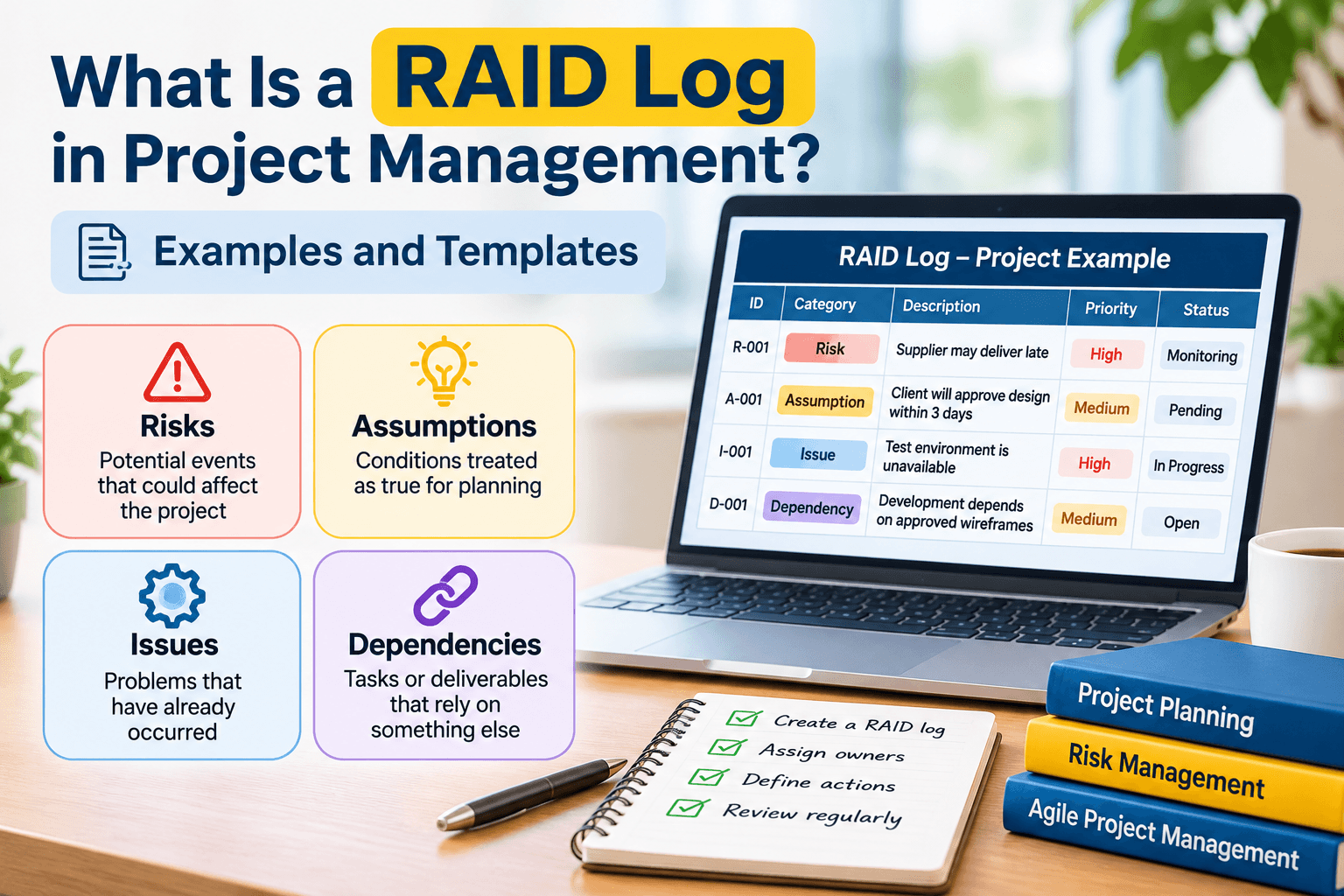
A RAID log is a project document that tracks four things that can change how a project moves: Risks, Assumptions, Issues, and Dependencies.
It gives the project manager and the team one place to record problems that might happen, planning assumptions that are not confirmed yet, obstacles that are already here, and work that cannot start until something else is done.
A shared log is easier to follow than the same details scattered across emails, meeting notes, spreadsheets, and side conversations.
A RAID log typically records:
- Risks: Potential events that could affect the project in the future.
- Assumptions: Conditions accepted as true for planning purposes but not yet fully confirmed.
- Issues: Problems that have already occurred and require attention.
- Dependencies: Tasks, resources, approvals, or deliverables that rely on something else being completed.
Some organizations swap the words. They might use Actions instead of Assumptions, or Decisions instead of Dependencies. Agree on the terms at the start and use them the same way for the whole project.
A RAID log is a working tool. Teams use it to name a concern, give it an owner, watch it, and act before it damages the project objectives.
What Does RAID Stand For?
Each letter in RAID is a different kind of project information. Knowing the difference helps you record the item in the right place and decide what to do about it.
1. Risks
A risk is an uncertain event or condition that may affect the project's objectives if it happens. The effect can be negative, such as a missed deadline or higher cost. It can also be positive, such as a chance to deliver extra value.
Project managers look for risks before they become real problems and plan a response that lowers the chance or the impact.
Examples of project risks include:
- A supplier may deliver essential materials later than expected.
- A key team member may become unavailable during an important project phase.
- Unexpected technical problems may increase development time.
- A client may request changes that affect the approved project scope.
- Project costs may increase because of changes in resource requirements.
A useful risk entry says what might happen, why it matters, how likely it is, and what the team plans to do.
For a closer look at finding, assessing, and responding to project risks, read our guide on project risk management and how to spot problems early.
2. Assumptions
An assumption is something the team treats as true so it can plan, even though it is not fully confirmed yet.
Plans often rest on assumptions about resources, deadlines, stakeholder availability, budgets, or outside requirements. If an assumption turns out to be wrong, the plan may need to change.
Examples of project assumptions include:
- The client will provide feedback within three business days.
- The required development team will remain available throughout the project.
- The existing software platform will support the planned features.
- The project budget will remain unchanged during the development phase.
- All required approvals will be received before the testing stage begins.
Write assumptions down and check them as the project moves. Give an owner the job of confirming the important ones, and note what you will do if an assumption is wrong.
3. Issues
An issue is a problem that has already happened and is affecting the project, or could affect it. A risk is something that might happen. An issue is something that has happened and needs attention now.
Issues can hit the schedule, the budget, the people, the quality, or what stakeholders expect. Record them with a clear owner and a plan to resolve them.
Examples of project issues include:
- A supplier has missed the agreed delivery date.
- The development environment is unavailable, preventing the team from testing.
- A team member has left the project unexpectedly.
- A client has rejected a submitted design.
- The project has exceeded its approved budget.
Every significant issue needs an owner, a priority, a proposed solution, and a target date. If the team cannot resolve it, escalate it to a sponsor or a senior stakeholder.
4. Dependencies
A dependency is a link between work. One activity, task, or deliverable cannot move until another activity, or an outside requirement, is done.
They matter because a delay in one task can stop other work from starting or finishing. Finding them early helps you coordinate teams, schedule the work, and avoid delays you could have seen coming.
Examples of project dependencies include:
- Website development cannot begin until the design team approves the wireframes.
- Software testing depends on the completion of development work.
- A product launch depends on receiving final approval from management.
- Employee training depends on the completion of training materials.
- A project milestone depends on a third-party vendor delivering a required component.
Write down what the project depends on, who must provide it, when it is needed, and what happens if it is late.
Some teams use D for Decisions instead of Dependencies. In that version, the log records important decisions, including who made them, when, and why. Be clear about which definition the team is using.
RAID Log Example in Project Management
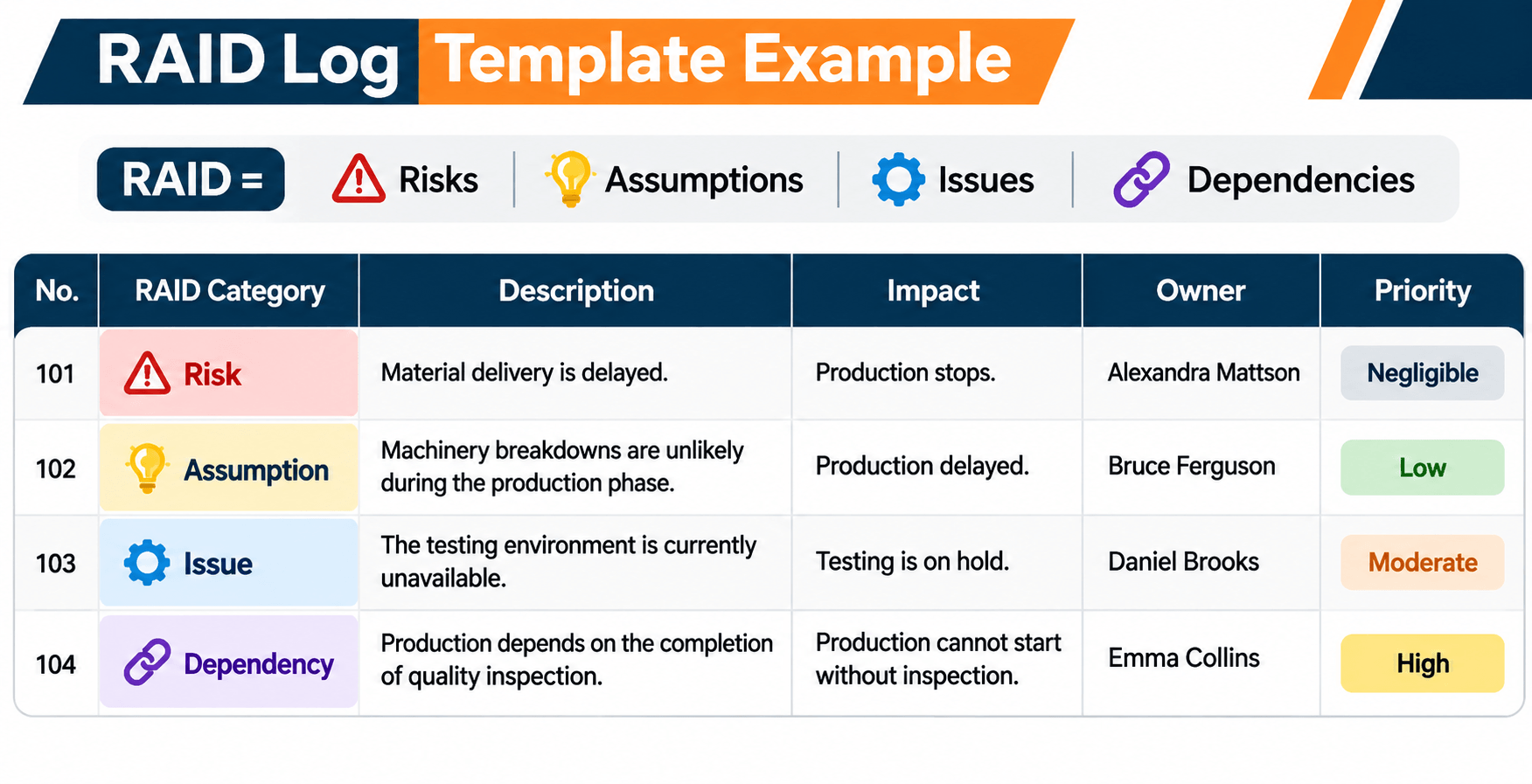
An example makes the log easier to picture. Imagine a company building a new website. The work includes design, development, content, testing, and launch.
During planning and delivery, the team finds risks, assumptions, issues, and dependencies it needs to watch.
| ID | Category | Description | Priority | Owner | Action or Response | Status |
|---|---|---|---|---|---|---|
| R-001 | Risk | The hosting provider may not support the expected website traffic at launch. | High | Technical Lead | Confirm hosting capacity and prepare a scaling plan. | Monitoring |
| A-001 | Assumption | The client will approve the website design within three business days. | Medium | Project Manager | Confirm the approval timeline with the client. | Pending Validation |
| I-001 | Issue | The development environment is unavailable, delaying testing. | High | Development Lead | Coordinate with IT to restore the environment and revise the testing schedule if needed. | In Progress |
| D-001 | Dependency | Development cannot begin until the design team delivers approved wireframes. | High | Design Lead | Confirm the wireframe delivery date and communicate any delay. | Open |
This is how a RAID log pulls different kinds of project information into one view. The project manager can see what needs attention, who owns it, and what should happen next.
Each entry has a clear description and an owner. Without an owner, even an important risk or issue can sit there because nobody is responsible for following it up.
How to Create a RAID Log Step by Step
You do not need complicated software to create a RAID log. A spreadsheet or a shared document is enough for many projects. What matters is a consistent structure and information you keep current.
Step 1: Define the Project Scope and Objectives
Before you build the log, be clear about what the project is supposed to deliver. Review the objectives, scope, timeline, budget, stakeholders, and major deliverables.
That context is what you use to spot risks, assumptions, issues, and dependencies.
If the project depends on an outside supplier, the supplier's delivery schedule belongs in the dependencies and in the risks.
Step 2: Identify Risks, Assumptions, Issues, and Dependencies
Work with the team and the relevant stakeholders to find anything that could change delivery.
Use brainstorming, stakeholder meetings, project documents, lessons from earlier projects, and team discussions.
Ask questions such as:
- What could prevent the project from meeting its deadlines?
- Which resources or approvals does the project depend on?
- What are we assuming to be true without confirmation?
- Have any problems already occurred?
- Which external teams or suppliers could affect delivery?
Put each item in the right RAID category. Do not mix different kinds of information into one unclear entry.
Step 3: Record Each Item Clearly
Write each entry in plain, specific language. Someone should be able to understand the situation without a long explanation from the person who wrote it.
For example, "vendor problem" is too vague. "The software vendor may deliver the integration component five days later than the agreed date" tells the team what is actually at stake.
A clear description makes it easier to judge the impact and decide the next action.
Step 4: Assign Owners and Priorities
Every important entry needs a person who will watch it or act on it.
An owner creates accountability and makes it clear who should give the update. Also prioritize entries by urgency, likelihood, impact, or severity.
A simple priority system can include:
- High: Requires immediate attention because it could seriously affect project objectives.
- Medium: Needs monitoring and planned action but does not currently require urgent escalation.
- Low: Has limited impact and can be reviewed during regular project updates.
For risks, look at both likelihood and impact. For issues, look at how serious the problem is and how soon it must be resolved.
Step 5: Define Actions and Response Plans
Writing the item down is only the start. The project manager and the team still have to decide what to do.
For a risk, define a mitigation or contingency plan. For an assumption, decide how and when it will be checked. For an issue, name the steps to resolve it. For a dependency, confirm who is responsible and the date it is needed.
Each action should be realistic, measurable, and assigned to an owner.
Step 6: Review and Update the RAID Log Regularly
Treat the log as a living document. It is not something you create once and then leave alone.
Review it in status meetings, planning sessions, milestone reviews, or other regular check-ins. Update an entry when the priority, owner, status, or response changes.
Close items that are resolved, add new concerns, and escalate issues that need a decision or support from outside the project team.
What Should a RAID Log Template Include?
A useful template makes each entry easy to understand, shows who owns it, and tracks the next action. The columns can change with the size of the project. Most teams still need the fields below.
| Template Field | Purpose |
|---|---|
| ID | A unique reference number for each entry, such as R-001 or I-001. |
| Category | Identifies whether the entry is a Risk, Assumption, Issue, or Dependency. |
| Description | Explains the situation clearly and briefly. |
| Date Identified | Records when the item was first added to the log. |
| Priority | Shows how urgently the item needs attention. |
| Owner | Identifies the person responsible for monitoring or resolving the item. |
| Action or Response | Describes the mitigation, validation, resolution, or coordination steps. |
| Due Date | Shows when the next action or resolution is expected. |
| Status | Tracks progress, such as Open, In Progress, Monitoring, or Closed. |
| Last Updated | Shows when the entry was most recently reviewed. |
Simple RAID Log Template Structure
You can copy this structure into Excel, Google Sheets, or the project tool you already use, then adjust it for the project.
| ID | Type | Description | Owner | Priority | Next Action | Due Date | Status |
|---|---|---|---|---|---|---|---|
| R-001 | Risk | Describe a potential future event. | Assigned owner | High | Define mitigation plan. | DD/MM/YYYY | Open |
| A-001 | Assumption | Describe an unconfirmed planning condition. | Assigned owner | Medium | Validate the assumption. | DD/MM/YYYY | Pending |
| I-001 | Issue | Describe a problem that has already occurred. | Assigned owner | High | Resolve or escalate the issue. | DD/MM/YYYY | In Progress |
| D-001 | Dependency | Describe the task or deliverable the project relies on. | Assigned owner | Medium | Confirm delivery or approval. | DD/MM/YYYY | Open |
On a larger project, you may also want likelihood, impact, escalation, a decision reference, and a next-review date. Keep the template as simple as the team can maintain, and still capture the information people actually use.
RAID Log vs. Risk Register: What Is the Difference?
A RAID log and a risk register are both project tools, and they do different jobs.
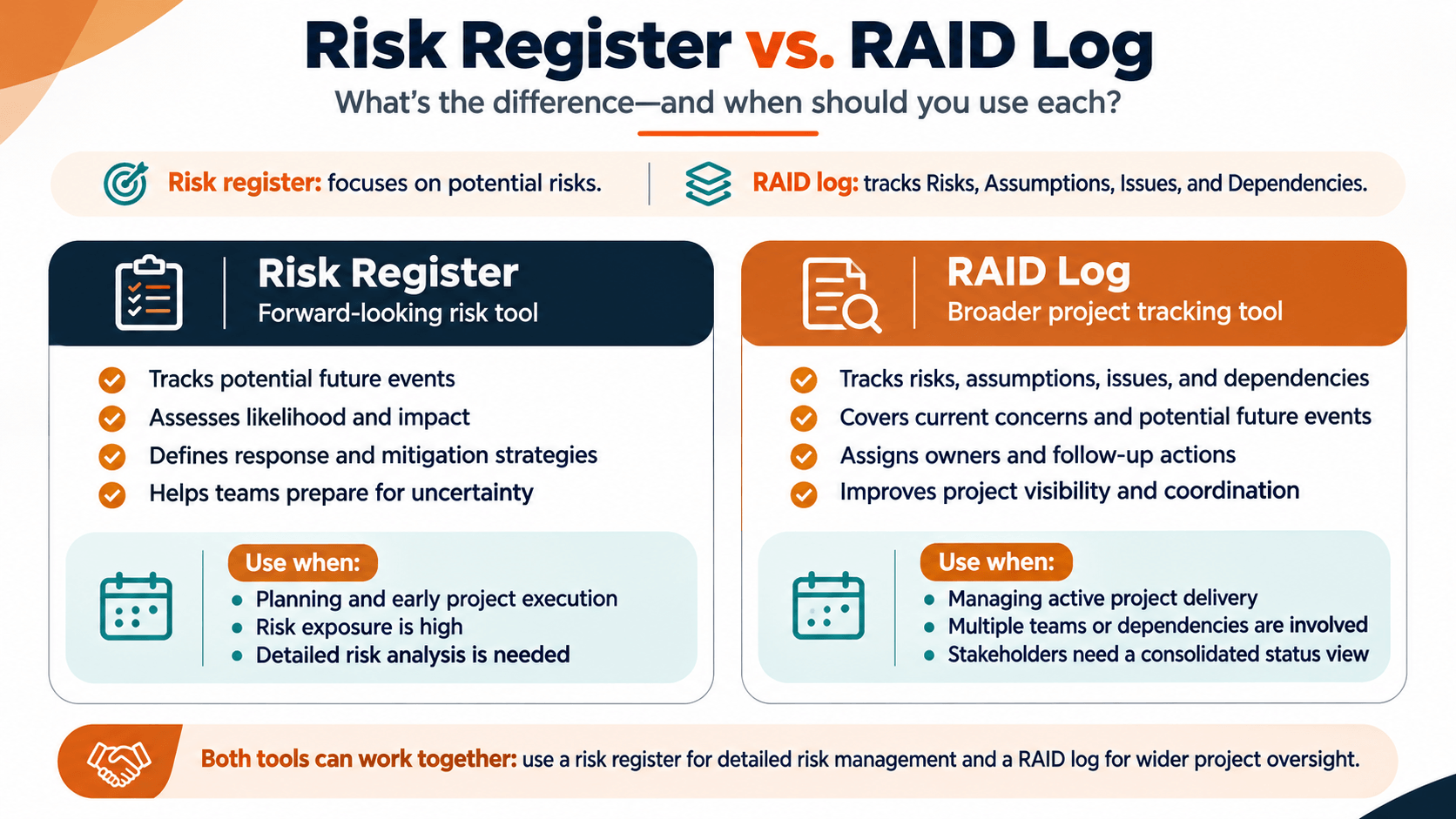
A risk register is specifically for identifying, assessing, prioritizing, and responding to risks. A RAID log is a wider view. It puts risks next to assumptions, issues, and dependencies in one tracking document.
| Comparison | RAID Log | Risk Register |
|---|---|---|
| Primary Purpose | Tracks multiple categories of project concerns. | Tracks and manages project risks. |
| Information Included | Risks, assumptions, issues, and dependencies. | Risk descriptions, likelihood, impact, owners, and response plans. |
| Focus | Overall project visibility and coordination. | Risk assessment and response planning. |
| Typical Users | Project managers, team members, and stakeholders. | Project managers, risk owners, and risk management teams. |
| Level of Detail | Can be a simple summary or a detailed tracking document. | Often includes more detailed risk analysis and response information. |
The RAID log can hold a summary of the risks, while a separate risk register holds the deeper analysis. The two documents can work together.
If you want more detail on how teams find and manage risks, read our article on project risk management.
When Should Project Managers Use a RAID Log?
A RAID log is useful across the project lifecycle. It helps most when several people, teams, suppliers, or stakeholders are involved in delivery.
During Project Initiation and Planning
At the start, the team can record the first risks, planning assumptions, and dependencies. Finding them early helps you build a realistic schedule and assign resources more carefully.
During Project Execution
New issues and risks show up as the work moves. The log gives the team a shared place to record them, name an owner, and track the action that keeps the project moving.
During Agile Projects
Agile teams work in short cycles and regularly review priorities, progress, and obstacles. A RAID log can support that by tracking dependencies, open issues, and risks that could affect the next stretch of work.
Review it in sprint planning, retrospectives, or regular team discussions, depending on how the team works.
For a closer look at iterative delivery, read our guide to Agile project management, its principles, methods, and real-world examples.
During Project Reviews and Stakeholder Meetings
Use the log in status meetings and stakeholder reviews to talk about the concerns that matter. People can see which items are open, who owns them, and whether a decision or extra support is needed.
Best Practices for Maintaining an Effective RAID Log
A RAID log only helps when the information is clear, accurate, and reviewed. A few habits keep it useful for decisions.
Keep Entries Specific and Actionable
Skip vague lines such as "schedule problem" or "technical concern." Say what the situation is, what it might affect, and what action is required. Specific entries are easier for the team to understand and act on.
Assign a Clear Owner to Every Important Entry
Each significant risk, assumption, issue, or dependency needs an owner. The project manager can keep the overall log. The owners still provide updates and finish the actions assigned to them.
Prioritize Items Based on Their Impact
Not every entry is equally urgent. Use likelihood and impact for risks, and severity and urgency for issues. That keeps attention on the items that could hurt the project objectives the most.
Keep the Log Updated
Review the document regularly and update it when important information changes. Close resolved items, revise assumptions that are out of date, and add new issues or dependencies when they appear.
Make the Log Accessible to Relevant Stakeholders
Keep the log in a shared place where the people who need it can open the latest version. One copy reduces the confusion that comes from several versions of the same list.
Use the RAID Log Alongside Other Project Documents
A RAID log does not replace the project plan, the schedule, an issue tracker, a risk register, or a communication plan. It is an overview of the concerns that matter, and it connects information that may live in those other documents.
Common RAID Log Mistakes to Avoid
A log that is poorly maintained loses its value. Watch for these mistakes:
- Confusing risks with issues: A risk may happen in the future, while an issue has already occurred. Recording them under the wrong category can lead to inappropriate responses.
- Using vague descriptions: Entries that do not explain the situation or its impact are difficult to manage.
- Not assigning owners: Without clear responsibility, important items may remain unresolved.
- Ignoring assumptions: Unverified assumptions can affect schedules, budgets, and project decisions if they are not checked.
- Failing to track dependencies: A delay in one task or team can affect several other activities.
- Creating the log but never reviewing it: Outdated information can cause teams to overlook current problems and priorities.
- Making the document unnecessarily complicated: Too many fields or excessive detail can make the log difficult to maintain.
The goal is a practical document that supports communication and action, not another form the team only updates when someone asks for it.
How AI Can Support RAID Log Management
AI tools can help a project manager organize project information and cut some of the manual work of keeping a RAID log. They can help review meeting notes, surface possible risks, summarize updates, and draft action items.
For example, a project manager could use an AI tool to read meeting notes and flag statements that look like a risk, an assumption, an issue, or a dependency. The tool can then suggest a draft entry for the log.
AI can also help project managers:
- Summarize long project discussions and status reports.
- Identify possible risks from project updates and stakeholder feedback.
- Organize issues by priority and potential impact.
- Draft mitigation actions and follow-up questions.
- Prepare concise RAID summaries for stakeholder meetings.
A project manager or the responsible team member should still review anything AI drafts. The tool can miss context, skip an important detail, or suggest an action that does not fit the project. Human judgment still matters when you assess a risk, confirm an assumption, assign an owner, or make a decision.
Project managers can build these skills by pairing the fundamentals with practical AI use. Learn more about WFI's AI-Powered Project Manager Bootcamp, which covers project planning, documentation, risk management, Agile approaches, and responsible AI use across the project lifecycle.
Build Practical Project Management Skills with WFI
Running a project well is more than tracking tasks and deadlines. You need to spot risks, coordinate dependencies, talk with stakeholders, resolve issues, and make informed decisions through the whole lifecycle.
Tools such as a RAID log help you plan and deliver in a more structured way. They work best when you also have broader project management knowledge and real practice.
The AI-Powered Project Manager Bootcamp at WorkForce Institute helps learners build practical project management skills and see how AI can support planning, documentation, reporting, communication, and decision-making. The program also includes preparation for the Certified Associate in Project Management (CAPM®) examination.
Whether you are starting a project management career or strengthening skills you already have, learning to manage risks, issues, assumptions, and dependencies can make you a more confident project professional.
Frequently Asked Questions About RAID Logs
1. What is a RAID log in simple terms?
It is a project document that tracks risks, assumptions, issues, and dependencies. Teams use it to watch the concerns that matter, assign an owner, and take action so the work stays on track.
2. What are the four components of a RAID log?
The four commonly used components are Risks, Assumptions, Issues, and Dependencies. Some organizations use other terms, such as Actions or Decisions, so the team should agree on the definitions it will follow.
3. What is the difference between a risk and an issue in a RAID log?
A risk is a possible future event that may affect the project. An issue is a problem that has already happened and needs attention. "A supplier may deliver late" is a risk. "A supplier has missed the delivery date" is an issue.
4. Who is responsible for maintaining a RAID log?
The project manager usually coordinates the log. Individual team members or stakeholders can own specific entries, and those owners provide updates and complete the assigned actions.
5. When should a RAID log be created?
Create it during initiation or planning, once the team understands the objectives, the scope, and the key stakeholders. Then update it through execution and review it at important milestones.
6. How often should a RAID log be updated?
Review it on a rhythm that matches the project's complexity and pace. Teams often update it in weekly meetings, sprint reviews, milestone discussions, or whenever a significant risk, issue, assumption, or dependency changes.
7. Can a RAID log be created in Excel?
Yes. Excel or Google Sheets can hold a simple RAID log. Organize entries by category and include columns for the description, owner, priority, action, due date, and status.
8. What is the difference between a RAID log and a risk register?
A risk register focuses on risks, how you assess them, and how you will respond. A RAID log covers a wider set of information: risks, assumptions, issues, and dependencies. The log can summarize the risks while a separate register holds the deeper analysis.
9. Is a RAID log used in Agile project management?
Yes. Agile teams can use a RAID log to track risks, assumptions, issues, and dependencies that might affect a sprint goal or delivery. Review it in planning, team meetings, and retrospectives.
10. What should a RAID log template include?
A basic template needs an ID, category, description, owner, priority, action or response, due date, and status. Larger projects may also include likelihood, impact, escalation details, and review dates.
Conclusion
A RAID log helps a team track risks, assumptions, issues, and dependencies through the life of a project. With that information in one place, a project manager can see the situation more clearly, assign owners, and respond sooner.
Creating the log is only the first step. The value comes from keeping the information accurate, reviewing the entries, and making sure every important item has an owner and a next action.
Whether you run traditional, Agile, or hybrid projects, knowing how to use a RAID log strengthens planning, communication, and risk management. Pair the practice with hands-on project experience, and you build the confidence to lead the work.