
Modern applications need more than well-written code to stay reliable. They also need infrastructure that can handle user requests, store information securely, scale with demand, and stay available as the business grows. That is where cloud architecture comes in.
Cloud architecture describes how cloud-based resources, services, networks, databases, storage systems, and applications work together to deliver digital solutions. A well-designed cloud environment helps organizations build scalable applications, manage infrastructure efficiently, improve availability, and respond when business requirements change.
For developers, cloud architecture is an important skill. Whether you are building a web application, developing APIs, managing databases, or deploying software, it shows you what happens behind the application and how its components communicate.
This guide covers what cloud architecture is, how it works, its main components, deployment and service models, popular cloud platforms, design principles, and best practices for reliable cloud-based applications.
What Is Cloud Architecture?
Cloud architecture is the structure of components and technologies used to build and operate applications and services in a cloud computing environment. It defines how computing resources, storage, databases, networks, security systems, and software applications are organized and connected.
Cloud architecture uses infrastructure and services from cloud platforms, so an organization does not have to depend entirely on physical servers in its office or data center. Those resources can be accessed, configured, and managed over the internet or through private network connections.
For example, an online shopping application may use cloud architecture to manage several operations:
- A frontend application displays products and allows customers to place orders.
- Backend services process customer requests and business logic.
- A cloud database stores customer, product, and order information.
- Cloud storage manages product images and other files.
- Load balancing distributes incoming traffic across application servers.
- Monitoring services help developers identify errors and performance issues.
Together, these components deliver a complete application experience.
How Does Cloud Architecture Work?
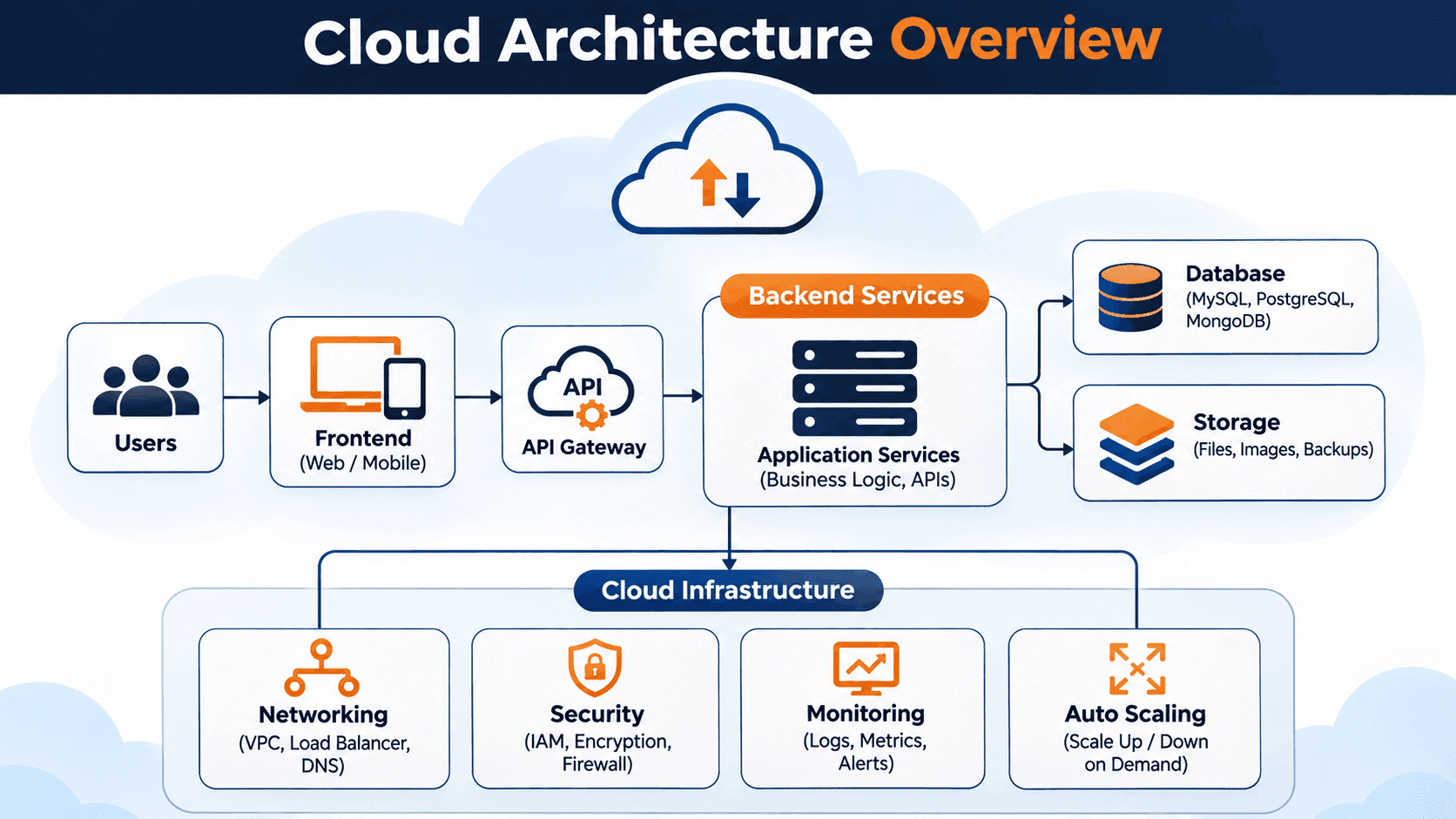
Cloud architecture connects cloud-based services so they can process requests, exchange information, and deliver application functionality. Each component has a specific job. They communicate through networks, APIs, and other integration mechanisms.
Consider a user opening an application hosted in the cloud. A simplified process looks like this:
- User request: A user opens a website or mobile application and performs an action.
- Frontend: The application's interface receives the user's input and sends a request to the backend.
- Network and API: The request travels through the network and reaches the appropriate application endpoint.
- Backend processing: Backend services validate the request, apply business rules, and perform the required operations.
- Database or storage: The application retrieves or updates information in the relevant database or storage service.
- Response: The backend returns the result to the frontend, which displays the information to the user.
Cloud platforms provide the infrastructure and managed services that support these operations. Depending on the application, the architecture may also include caching, authentication, monitoring, content delivery networks, message queues, and automated scaling.
Core Components of Cloud Architecture
A cloud environment is made of several components that support application development, deployment, and day-to-day operation. Understanding these components helps developers make better architectural decisions.
1. Frontend Platform
The frontend is the part of an application that users interact with directly. It includes websites, mobile applications, dashboards, and other interfaces.
Frontend applications display information, collect user input, and communicate with backend services through APIs. They may be hosted with cloud-based web hosting or content delivery services.
Common frontend technologies include:
- HTML, CSS, and JavaScript
- React and Next.js
- Angular
- Vue.js
- Mobile development frameworks
2. Backend Services
Backend services handle the operations that take place behind the user interface. They process requests, run business logic, manage authentication, and communicate with databases and other services.
Backend applications can run on virtual machines, containers, serverless platforms, or managed application hosting services. If you are building your software engineering career, read WFI's guide on how to become an AI software engineer to explore the broader skills and development roadmap involved in modern software roles.
Common backend technologies include:
- Node.js
- Python
- Java
- PHP
- .NET
Backend developers should understand how their applications interact with cloud infrastructure, including networking, security, storage, and deployment services. These concepts also connect with broader software engineering skills and modern application development practices.
3. Cloud Computing Infrastructure
Cloud infrastructure provides the computing resources required to run applications and services. It includes virtual machines, processing resources, networking, and other infrastructure services.
Organizations can provision resources according to their requirements, so they do not have to purchase and maintain all physical hardware themselves.
Cloud infrastructure commonly includes:
- Virtual machines and computing instances
- Networking and virtual private networks
- Load balancers
- Firewalls and security controls
- Container hosting environments
4. Cloud Storage
Cloud storage lets applications store and retrieve files and other data through cloud-based services. It is commonly used for documents, images, videos, backups, logs, and application assets.
Different storage types serve different purposes:
- Object storage: Stores unstructured data such as images, videos, and backups.
- Block storage: Provides storage volumes commonly attached to virtual machines and applications.
- File storage: Provides shared file systems that applications and users can access.
The right storage type depends on performance requirements, access patterns, data size, and application needs.
5. Cloud Databases
Databases store and organize the information applications use. Cloud platforms offer managed database services that help organizations deploy, maintain, back up, and scale database systems.
Common database options include:
- Relational databases: MySQL, PostgreSQL, and Microsoft SQL Server.
- NoSQL databases: MongoDB and cloud-native document or key-value databases.
- Data warehouses: Services designed for large-scale analytical queries and reporting.
Choose a database based on the application's data structure, consistency requirements, query patterns, and expected workload.
6. Networking and Content Delivery
Networking connects cloud resources so applications, databases, users, and external services can communicate. Cloud networking services define how traffic moves through an environment and which resources can communicate with one another.
Common networking components include:
- Virtual private clouds or virtual networks
- Subnets and routing tables
- Firewalls and security groups
- Load balancers
- DNS services
- Content delivery networks (CDNs)
A content delivery network can improve performance by distributing cached content through locations closer to users.
7. Security and Identity Management
Security is a fundamental part of cloud architecture. Applications must protect user information, control access to resources, and prevent unauthorized activity.
Important security components include:
- Identity and access management (IAM)
- Multi-factor authentication
- Encryption for data at rest and in transit
- Network security controls
- Secrets and key management
- Security monitoring and audit logs
Follow the principle of least privilege. Give users, applications, and services only the permissions they need to perform their tasks.
8. Monitoring and Management Tools
Monitoring tools help development and operations teams see how applications and infrastructure are performing. They collect information about system health, application errors, resource utilization, and network activity.
Common monitoring capabilities include:
- Application performance monitoring
- Centralized logging
- Infrastructure metrics
- Alerts and notifications
- Distributed tracing
- Cost and resource monitoring
Monitoring helps teams identify problems early, investigate failures, and keep applications reliable.
Types of Cloud Architecture
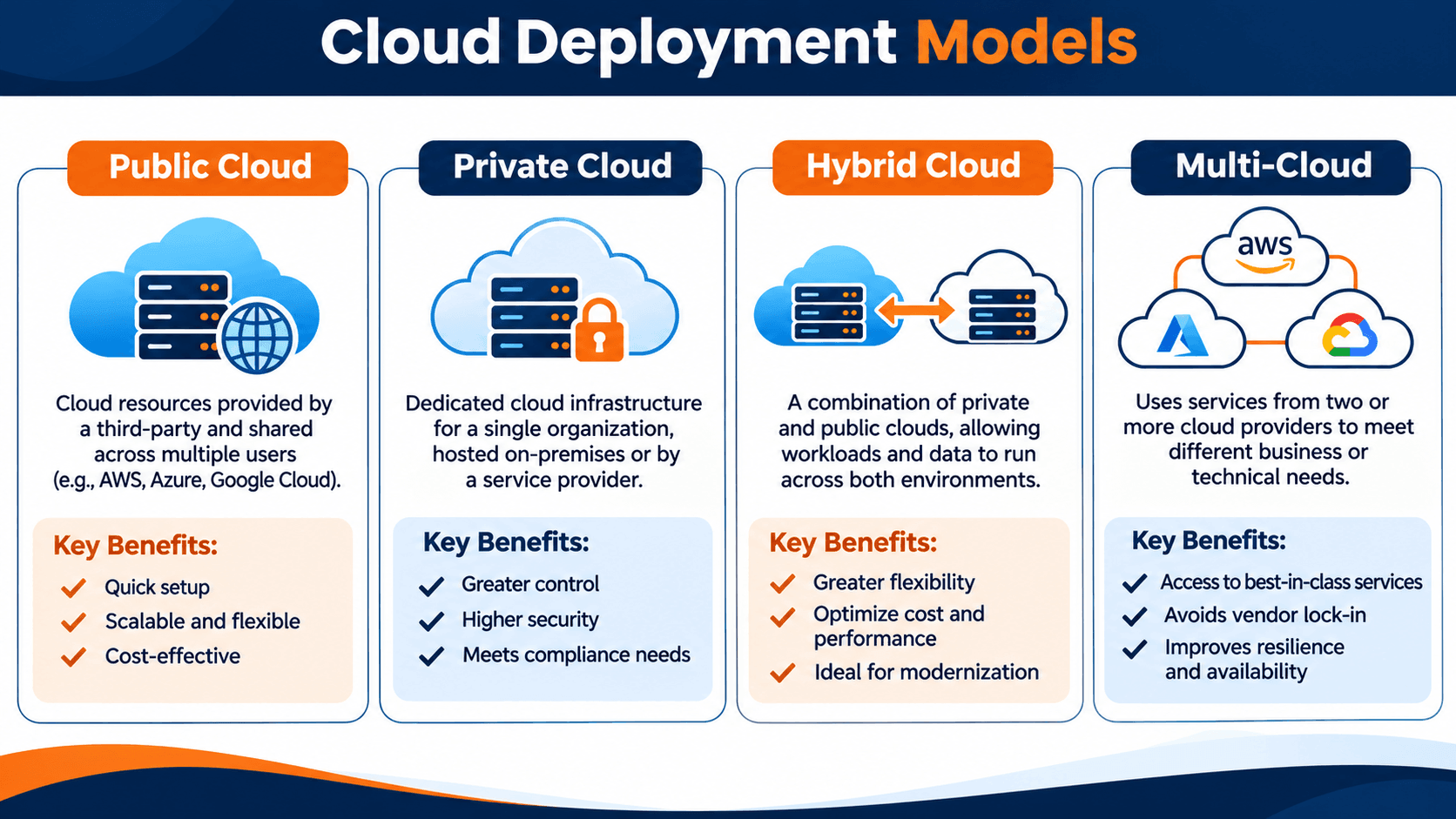
Cloud architecture can be designed in different ways based on security requirements, infrastructure needs, budget, and operational goals. The main deployment models are public, private, hybrid, and multi-cloud.
1. Public Cloud Architecture
Public cloud architecture uses computing resources from a third-party cloud provider. Those resources are delivered over the internet or through dedicated network connections, and they are typically shared across customers through logically isolated environments.
Public cloud platforms offer services such as virtual machines, databases, storage, networking, and application hosting.
Advantages:
- Resources can be provisioned quickly.
- Infrastructure can scale according to demand.
- Organizations do not need to maintain their own physical data centers for every workload.
- Many managed services are available.
Considerations:
- Costs must be monitored to avoid unexpected usage charges.
- Security configurations require careful management.
- Some workloads may have regulatory or data-location requirements.
2. Private Cloud Architecture
Private cloud architecture provides cloud computing resources dedicated to a single organization. The environment may be hosted in the organization's own data center or by an external service provider.
Private cloud environments are often used when an organization needs greater control over infrastructure, security configurations, or compliance requirements.
Advantages:
- Greater control over infrastructure configuration.
- Dedicated resources for the organization.
- More flexibility for certain security and compliance requirements.
Considerations:
- Infrastructure management may require specialized teams.
- Initial setup and ongoing maintenance can be expensive.
- Scaling may require additional capacity planning.
3. Hybrid Cloud Architecture
Hybrid cloud architecture combines private infrastructure with public cloud services. An organization can keep selected workloads or sensitive data in a private environment and use public cloud resources for other applications and services.
A financial organization may keep certain sensitive systems in a private environment while using public cloud services for customer-facing applications, analytics, or additional computing capacity.
Advantages:
- Supports different infrastructure and workload requirements.
- Allows organizations to combine private and public resources.
- Can provide flexibility when modernizing existing systems.
Considerations:
- Connecting environments securely can be complex.
- Monitoring and managing multiple environments requires planning.
- Data movement and integration need careful design.
4. Multi-Cloud Architecture
Multi-cloud architecture uses services from more than one cloud provider. An organization might use one provider for application hosting, another for analytics, and another for specialized services.
Organizations may adopt a multi-cloud strategy to meet technical requirements, use specific provider capabilities, or reduce dependence on a single cloud platform.
Advantages:
- Access to services and capabilities from multiple providers.
- Flexibility in selecting technologies for different workloads.
- Potential to reduce reliance on one provider.
Considerations:
- Managing multiple platforms can increase operational complexity.
- Security policies and monitoring must be consistent.
- Teams may need expertise in several cloud environments.
Cloud Service Models: IaaS, PaaS, and SaaS
Cloud service models describe how much of the technology stack the cloud provider manages and how much responsibility stays with the customer. The three widely used models are Infrastructure as a Service, Platform as a Service, and Software as a Service.
1. Infrastructure as a Service (IaaS)
Infrastructure as a Service provides fundamental computing resources such as virtual machines, storage, and networking. Customers configure operating systems, applications, and other software. The cloud provider manages the underlying physical infrastructure.
Example: A development team creates virtual machines to host a custom web application and configures the operating system, runtime, and application environment.
Best suited for: Organizations that need control over operating systems, infrastructure configuration, and application environments.
2. Platform as a Service (PaaS)
Platform as a Service provides a managed environment for developing, deploying, and running applications. The provider manages much of the underlying infrastructure and platform, so developers can focus more on application code.
Example: A developer deploys a web application to a managed application platform without manually configuring every server component.
Best suited for: Development teams that want to reduce infrastructure management and accelerate application deployment.
3. Software as a Service (SaaS)
Software as a Service delivers ready-to-use software through the internet. The provider manages the application and supporting infrastructure. Users access the software through a browser or application.
Examples: Web-based email platforms, online collaboration tools, and cloud-based customer relationship management systems.
Best suited for: Individuals and organizations that need software functionality without managing the underlying application infrastructure.
Popular Cloud Architecture Platforms
Several cloud providers offer infrastructure, application hosting, databases, storage, networking, security, and development services. The right platform depends on technical requirements, existing systems, budget, and team expertise.
1. Amazon Web Services (AWS)
Amazon Web Services is a cloud computing platform with services for infrastructure, storage, databases, networking, security, analytics, and application development.
Common AWS services include:
- Amazon EC2: Provides virtual computing capacity.
- Amazon S3: Provides scalable object storage.
- Amazon RDS: Provides managed relational database services.
- AWS Lambda: Runs code in response to events without requiring users to manage servers.
- Amazon VPC: Provides logically isolated networking environments.
- Elastic Load Balancing: Distributes incoming application traffic.
AWS is used for applications ranging from small websites to large distributed systems.
2. Microsoft Azure
Microsoft Azure provides cloud services for computing, networking, storage, databases, application development, identity, and enterprise workloads.
Common Azure services include:
- Azure Virtual Machines: Provides virtualized computing resources.
- Azure Blob Storage: Stores unstructured data.
- Azure SQL Database: Provides a managed relational database service.
- Azure Functions: Supports event-driven serverless computing.
- Azure Virtual Network: Connects and isolates cloud resources.
- Azure Kubernetes Service (AKS): Provides managed Kubernetes orchestration.
Azure is commonly used by organizations that work with Microsoft technologies and enterprise systems.
3. Google Cloud
Google Cloud offers cloud infrastructure and managed services for application development, data processing, analytics, networking, and machine learning.
Common Google Cloud services include:
- Compute Engine: Provides virtual machines.
- Cloud Storage: Provides object storage.
- Cloud SQL: Provides managed relational databases.
- Google Kubernetes Engine (GKE): Provides managed Kubernetes services.
- Cloud Run: Runs containerized applications on a managed platform.
- BigQuery: Supports large-scale data analytics.
Google Cloud is used for application hosting, data analytics, containerized workloads, and other cloud computing requirements.
Cloud Architecture Design Principles
A well-designed cloud environment should meet application requirements and stay secure, reliable, maintainable, and cost-effective. Developers and architects can use several design principles to reach those goals.
1. Design for Scalability
Cloud applications should be able to handle changes in workload. Scalability means increasing or decreasing resources as application demand changes.
Vertical scaling increases the capacity of an existing resource, such as adding more memory or processing power to a virtual machine. Horizontal scaling adds more instances or resources to distribute the workload.
For applications with changing traffic, horizontal scaling and automated scaling policies can help maintain performance.
2. Build for High Availability
High availability means designing systems so they stay accessible when an individual component fails. Developers can improve availability by distributing workloads across multiple availability zones, using redundant components, and implementing health checks.
Applications should also have backup and recovery processes so a failure does not cause permanent data loss.
3. Prioritize Security
Security should be part of design and development from the start. Protect data, control access, secure network communication, and monitor suspicious activity.
Useful practices include encryption, least-privilege access, secure authentication, secrets management, and regular security reviews.
4. Use Automation
Automation reduces repetitive manual work and helps teams deploy infrastructure and applications consistently. Infrastructure as Code (IaC) tools let developers define cloud resources with configuration files or code.
Tools such as Terraform and cloud-provider infrastructure templates help teams create repeatable environments, track changes, and reduce configuration errors. These practices are part of a wider shift toward more automated software workflows. You can also explore WFI's AI software engineering articles for related perspectives on how development practices are evolving.
5. Monitor Performance and Reliability
Monitoring helps developers understand application behavior and detect problems before they affect a large number of users.
Teams should monitor application response times, error rates, resource utilization, database performance, and infrastructure health. Logs, metrics, and traces provide useful information for troubleshooting.
6. Optimize Cloud Costs
Cloud resources can generate costs based on usage, storage, data transfer, and service configuration. A good cloud architecture uses resources efficiently and avoids unnecessary spending.
Developers and cloud teams should review resource utilization, remove unused resources, select suitable service tiers, and set scaling policies according to actual demand.
Cloud Architecture Best Practices for Developers
Developers play an important role in building and maintaining cloud-based applications. Practical best practices help create systems that are easier to operate, secure, and scale.
1. Choose the Right Architecture for the Application
Not every application needs a complex distributed architecture. A small application may work well with a simple deployment. A large platform with many independent services may benefit from a more distributed design.
Choose an architecture based on actual requirements, including application size, expected traffic, team capabilities, budget, and maintenance needs.
2. Use Managed Services Where Appropriate
Managed cloud services can reduce the infrastructure that development teams need to maintain. A managed database service, for example, may handle routine maintenance, backups, and certain availability tasks.
Before you adopt a managed service, understand its limitations, pricing, security responsibilities, and available configuration options.
3. Design Secure APIs
APIs allow application components and external systems to communicate. Protect API endpoints with authentication, authorization, input validation, rate limiting, and secure transport protocols.
Avoid exposing sensitive information in API responses and application logs.
4. Use Containers When They Fit the Workload
Containers package an application and its dependencies into a consistent unit that can run across supported environments. They help teams standardize deployment and simplify environment management.
Docker is commonly used to build and run containers. Kubernetes can orchestrate containerized applications across clusters when the workload requires that level of management.
5. Implement Continuous Integration and Continuous Delivery
CI/CD practices automate parts of the software development and release process. A pipeline can run tests, build application packages, scan for vulnerabilities, and deploy approved changes.
Automated delivery reduces manual deployment work and makes releases more consistent.
6. Plan for Backup and Disaster Recovery
Cloud-based systems still need reliable backup and recovery strategies. Know which data must be backed up, how frequently backups should run, and how applications will be restored after a failure.
Define recovery objectives according to business requirements, and test them regularly.
7. Document Architecture Decisions
Architecture documentation helps developers and operations teams understand how an application is structured and why specific technical decisions were made.
Useful documentation may include architecture diagrams, network layouts, service dependencies, security requirements, deployment instructions, and recovery procedures.
Common Cloud Architecture Challenges
Cloud platforms provide many advantages. Designing and managing cloud environments can still involve technical and operational challenges.
1. Security Misconfiguration
Incorrect access permissions, exposed storage, weak authentication, and poorly configured network rules can create security risks. Review cloud configurations regularly and apply security controls consistently.
2. Unexpected Cloud Costs
Unused resources, excessive data transfer, oversized instances, and unmonitored services can increase cloud expenses. Cost monitoring, budget alerts, and regular resource reviews help control spending.
3. Vendor Lock-In
Vendor lock-in can occur when an application depends heavily on services or technologies that are specific to one cloud provider. Moving that application to another platform may require significant changes.
Evaluate portability requirements and provider-specific dependencies before making architectural decisions.
4. Complex Distributed Systems
Applications that use multiple services, containers, databases, and networks can become difficult to manage. Distributed systems introduce challenges involving communication failures, latency, service dependencies, and data consistency.
Clear service boundaries, monitoring, documentation, and failure-handling strategies can help manage this complexity.
5. Skills and Knowledge Gaps
Cloud architecture requires knowledge of networking, security, infrastructure, application development, databases, automation, and monitoring. Teams may need ongoing training to work effectively as cloud technologies change.
Cloud Architecture vs. Traditional IT Architecture
Cloud architecture and traditional IT architecture both provide the infrastructure needed to run applications and manage data. They differ in how resources are provisioned, managed, scaled, and maintained.
| Area | Cloud Architecture | Traditional IT Architecture |
|---|---|---|
| Infrastructure | Uses cloud-hosted resources and services. | Often relies on organization-owned physical infrastructure. |
| Provisioning | Resources can often be provisioned through portals, APIs, or automation. | May require purchasing, installing, and configuring hardware. |
| Scalability | Resources can be adjusted according to workload and service limits. | Scaling may require additional physical capacity. |
| Maintenance | Some infrastructure and platform maintenance is handled by the cloud provider. | The organization is generally responsible for maintaining its infrastructure. |
| Cost model | Often based on resource usage, subscriptions, or service pricing. | Often includes hardware purchases, facilities, maintenance, and licensing. |
| Access | Can support access through internet or private connections. | Often depends on internal networks and configured remote access. |
The best approach depends on an organization's requirements. Some organizations use cloud environments. Others keep traditional infrastructure or combine both approaches.
How Developers Can Build Skills in Cloud Architecture
Start with a strong foundation in software development, then expand into infrastructure, networking, security, and cloud services.
Here are practical steps to get started:
1. Understand the Fundamentals of Cloud Computing
Start by learning what cloud computing is, how cloud resources are delivered, and how public, private, hybrid, and multi-cloud environments differ.
2. Learn Networking Fundamentals
Learn IP addresses, DNS, HTTP and HTTPS, subnets, routing, firewalls, and virtual networks. Networking knowledge shows you how cloud components communicate.
3. Choose a Cloud Platform
Start with one platform, such as AWS, Microsoft Azure, or Google Cloud. Learn its core computing, storage, networking, database, and identity services before you explore more advanced services.
4. Practice With Small Projects
Practical projects connect cloud concepts with real application development. For example, you can:
- Deploy a simple website using a cloud hosting service.
- Build a backend API and connect it to a managed database.
- Store application images and files in cloud object storage.
- Configure a virtual network and access controls.
- Deploy a containerized application.
- Set up application monitoring and alerts.
5. Learn Automation and DevOps Tools
Explore Git, CI/CD pipelines, Docker, Kubernetes, and Infrastructure as Code tools. These technologies help developers automate deployments and manage cloud environments more consistently.
6. Understand Cloud Security
Learn identity and access management, encryption, secrets handling, network security, and secure application configuration. Security knowledge is essential when applications handle user data and business information.
Developers who want to strengthen their broader software engineering capabilities can explore the WFI AI for Software Engineers Bootcamp. For a practical look at how AI is changing everyday coding tasks, refactoring, documentation, and testing, read WFI’s article collection on AI software engineering.
Future Trends in Cloud Architecture
Cloud architecture continues to change as organizations adopt new technologies and application delivery approaches. Developers should understand the trends that influence how modern cloud systems are designed.
1. Serverless Computing
Serverless computing lets developers run application code without managing the underlying servers directly. Cloud providers handle much of the infrastructure provisioning and scaling. Customers remain responsible for application code and configuration.
Serverless services are commonly used for event-driven applications, APIs, background tasks, and automated workflows.
2. Containerization and Kubernetes
Containers package applications with their dependencies, which makes deployment more consistent across environments. Kubernetes helps automate container deployment, scaling, and management across clusters.
These technologies are especially useful for organizations running applications made up of multiple services.
3. Edge Computing
Edge computing processes certain data closer to where it is generated or consumed, so every operation does not have to go to a centralized cloud location. This can reduce latency and support applications that need faster local processing.
4. AI-Driven Cloud Operations
Artificial intelligence and machine learning are increasingly used to support cloud monitoring, anomaly detection, resource optimization, and operational analysis.
These capabilities can help teams identify unusual activity, investigate system performance, and make more informed infrastructure decisions.
Human review and appropriate security controls remain important.
5. Infrastructure as Code
Infrastructure as Code remains an important way to manage cloud environments. Teams define infrastructure in version-controlled files and create repeatable deployments through automation.
6. Cloud-Native Application Development
Cloud-native development focuses on building applications that use cloud capabilities such as automation, managed services, containers, distributed architectures, and elastic infrastructure.
Developers increasingly need to understand how application design and infrastructure decisions work together.
Frequently Asked Questions About Cloud Architecture
What is cloud architecture in simple terms?
Cloud architecture is the way cloud-based applications and infrastructure components are organized and connected. It includes computing resources, databases, storage, networking, security, and software services that work together to run applications.
What are the main components of cloud architecture?
The main components include frontend applications, backend services, computing infrastructure, storage, databases, networking, security and identity management, and monitoring tools.
What are the four main types of cloud architecture?
The four commonly discussed cloud deployment models are public cloud, private cloud, hybrid cloud, and multi-cloud. Each model offers a different mix of control, flexibility, and infrastructure management.
What is the difference between IaaS, PaaS, and SaaS?
IaaS provides computing infrastructure such as virtual machines and storage. PaaS provides a managed platform for building and deploying applications. SaaS provides ready-to-use software that users access through the internet.
Which cloud platform is best for developers?
AWS, Microsoft Azure, and Google Cloud all offer services for application development and deployment. The best choice depends on project requirements, existing technologies, pricing, available services, and team experience.
Is cloud architecture important for backend developers?
Yes. Backend developers often work with APIs, databases, application hosting, storage, authentication, and networking. Understanding cloud architecture helps them build, deploy, and maintain applications more effectively.
Do developers need to learn AWS, Azure, and Google Cloud?
Developers do not need to master every cloud platform at once. Learn the fundamentals and gain practical experience with one platform first. You can explore additional platforms as your projects and career requirements change.
What skills are required to learn cloud architecture?
Useful skills include programming, networking fundamentals, database management, operating systems, cloud computing, security, automation, monitoring, and application deployment. Practical project experience is also important.
Is cloud architecture the same as cloud computing?
No. Cloud computing refers to delivering computing services over a network. Cloud architecture describes how those services and application components are designed, organized, and connected to meet specific requirements.
Final Thoughts
Cloud architecture is the foundation for building and operating modern applications. By combining computing infrastructure, databases, storage, networking, security, and application services, organizations can create systems that respond to changing workloads and business requirements.
For developers, learning cloud architecture means understanding more than how to write application code. It also means knowing how applications are deployed, how services communicate, how data is managed, and how systems stay secure and reliable.
Start with cloud computing fundamentals, choose a platform, and build practical projects. Then explore automation, security, containers, and distributed systems. These skills can help you become a more capable developer and contribute to modern cloud-based software projects.