An SEO interview can feel heavy when you are just starting in digital marketing. Employers usually ask about keyword research, on-page SEO, technical SEO, link building, analytics, and how search engines work, because they want to see whether you can use the ideas on a real site.
That applies if you are applying for an SEO executive, SEO specialist, digital marketing associate, or content optimization role. A solid grasp of the fundamentals makes the conversation easier.
This guide covers 60 SEO interview questions and answers, from basic ideas to technical topics and practical scenarios. Each answer is written so you can understand the idea and explain it clearly in an interview.
If you are new to the field, start with our guide on how to get started in SEO before you work through the questions below. You can also look at WFI's instructor-led Digital Marketing Bootcamp if you want structured digital marketing training.
Section 1: Basic SEO Interview Questions and Answers
1. What is SEO?
SEO stands for Search Engine Optimization. It is the work of improving a website's visibility in organic, unpaid search results. That includes the content, the structure, how the site performs, and the authority signals that help search engines understand a page and match it to a relevant search.
2. Why is SEO important for businesses?
SEO helps a business reach people who are already searching for its products, services, or information. It can raise organic visibility, build awareness, bring more site traffic, and support leads. Organic clicks are not paid for one by one the way ads are.
3. How do search engines work?
Search engines generally work through three main stages:
- Crawling: Search engine bots discover and access web pages.
- Indexing: Search engines analyze page content and store information they consider eligible for their index.
- Serving search results: Search engines select and display relevant results in response to a user's query.
Knowing these stages helps you figure out why a page might not show up in search results.
4. What is the difference between organic and paid search results?
Organic results appear because the search engine considers the page relevant to the query. Paid results are ads a business pays to show, for example through Google Ads.
SEO works on organic visibility. Search engine marketing can include paid ads and other search activity. Learn more about how paid and organic search can work together.
5. What are the main types of SEO?
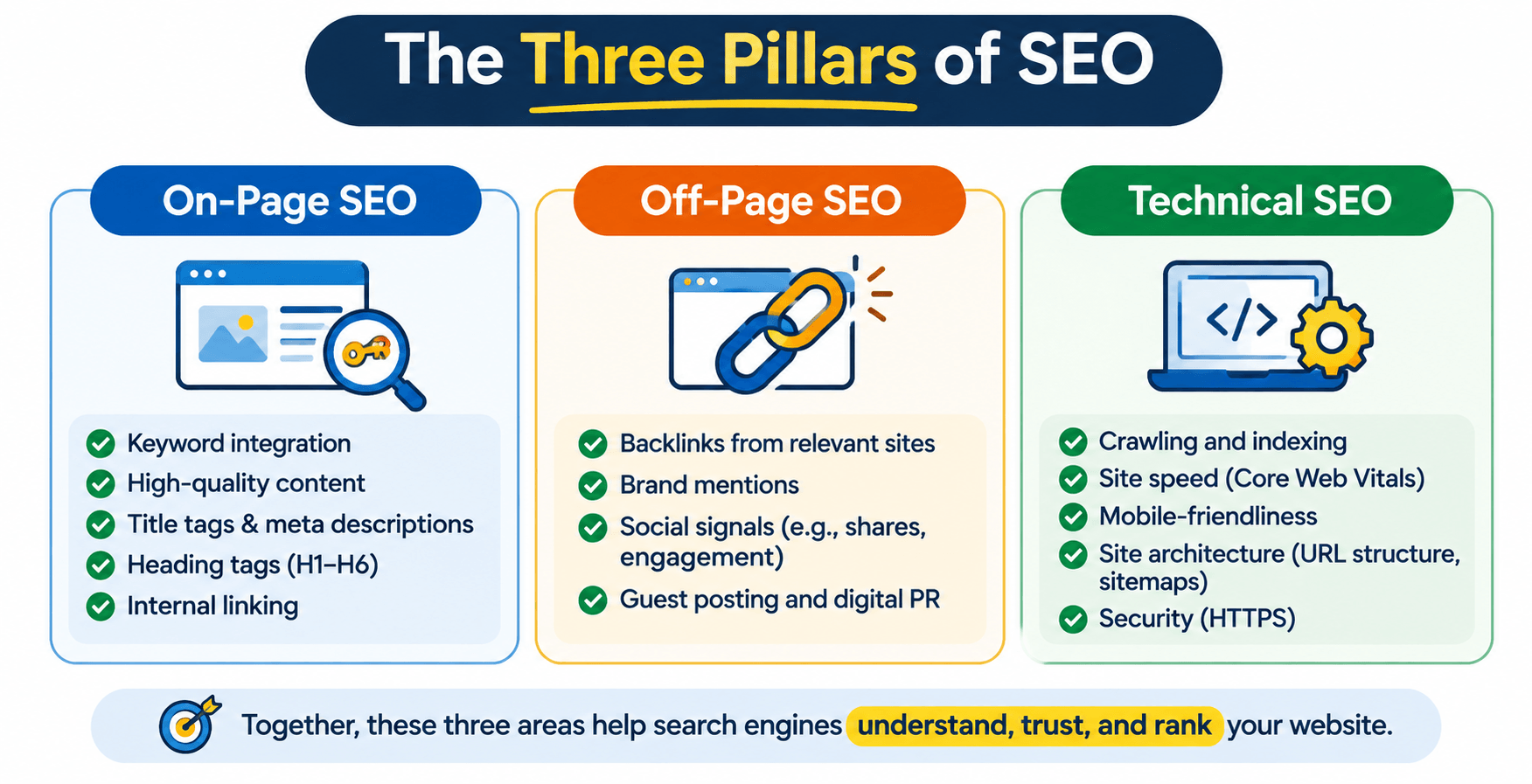
The three commonly discussed areas of SEO are:
- On-page SEO: Optimizing page content, headings, title tags, internal links, and other page elements.
- Off-page SEO: Building website authority through relevant backlinks, brand mentions, and other activities outside the website.
- Technical SEO: Improving crawling, indexing, site architecture, performance, and other technical aspects of a website.
These sit inside a wider digital marketing plan. If you want skills across different channels, look at WFI's Digital Marketing Bootcamp.
6. What is a SERP?
SERP stands for Search Engine Results Page. It is the page a search engine shows after someone enters a query. A SERP can include organic listings, ads, featured snippets, images, videos, local results, and other search features.
7. What is a keyword in SEO?
A keyword is a word or phrase people type into search. SEO work includes researching those terms so you understand demand and can create content that matches what people need and why they searched.
Someone searching for "digital marketing courses" might want a training program, a comparison, or how to enroll.
8. What is search intent?
Search intent is the reason behind the query. If you understand it, you can create content that answers the real question or meets the goal of the search.
Common types of search intent include:
- Informational: The user wants to learn something.
- Navigational: The user wants to find a particular website or page.
- Commercial investigation: The user is researching products or services before making a decision.
- Transactional: The user is ready to take an action, such as purchasing or signing up.
9. What is the difference between SEO and SEM?
SEO is about organic search visibility. SEM, or Search Engine Marketing, is a broader label for marketing through search engines. Depending on the context, it can include paid search and SEO. Many teams use SEM to mean paid search specifically.
10. What is organic traffic?
Organic traffic is visitors who arrive from unpaid search results. SEO tries to grow that traffic and make sure it is relevant to the queries the pages should rank for.
Section 2: On-Page SEO Interview Questions
11. What is on-page SEO?
On-page SEO is optimizing a single page so it is more relevant, easier to use, and easier to find. That covers content quality, keyword placement, headings, title tags, meta descriptions, images, and internal links.
12. What is a title tag?
A title tag is the HTML element that names a page. Search engines may use it as the clickable title in results. A good title describes the page accurately, is unique when it should be, and makes the subject clear.
13. What is a meta description?
A meta description is an HTML attribute that summarizes the page. Search engines may show it under the title, or they may write their own snippet from the page. A useful description is relevant, clear, and written for people who are a good fit to click.
14. What are heading tags in SEO?
Heading tags break a page into sections. HTML uses H1 through H6. The H1 is usually the main topic. H2 and H3 organize the sections and details under it.
15. What is keyword density?
Keyword density is how often a keyword appears compared with the total word count. Google does not publish a target percentage for rankings. Use the keyword where it helps the reader. Repeating it too much is keyword stuffing.
16. What is keyword cannibalization?
Keyword cannibalization is when several pages on the same site target very similar queries and compete for the same intent. Search engines then have a harder time choosing which page should rank. You might separate the intent, improve internal links, merge overlapping content, or redirect a page when that is the right fix.
17. What are internal links?
Internal links connect one page on a site to another page on the same site. They help people find related content and help search engines understand the structure and how pages relate.
18. What are external links?
External links point from your site to another site. Linking to a reliable, relevant source can give readers more context. Add them because they help, not just to increase the number of links on the page.
19. What is image alt text?
Alt text is an HTML attribute that describes an image. Screen readers use it, and it gives search engines more context about the image. Describe the image accurately. Do not stuff keywords into it.
20. What is duplicate content?
Duplicate content is substantially similar content at more than one URL, on the same site or across sites. Search engines then have a harder time choosing the preferred URL. Canonical tags and redirects can manage duplicate URL versions when they are appropriate.
21. What is a canonical tag?
A canonical tag tells search engines which URL you prefer when similar or duplicate versions exist. It points to the version that should generally be treated as the main one.
Example:
<link rel="canonical" href="https://example.com/seo-guide" />22. What is an SEO-friendly URL?
An SEO-friendly URL is clear, descriptive, readable, and relevant to the page topic. It avoids extra parameters and confusing strings when you can.
- Better:
example.com/seo-interview-questions - Less descriptive:
example.com/page?id=12345
Section 3: Off-Page SEO Interview Questions
23. What is off-page SEO?
Off-page SEO is work done outside the site to support visibility, reputation, and authority. That includes earning relevant backlinks, digital PR, brand mentions, and promoting useful content.
24. What are backlinks?
Backlinks are links from other sites that point to your site or a specific page. Relevant, trustworthy links help search engines find content and can support authority and search performance.
25. What is the difference between dofollow and nofollow links?
"Dofollow" is an informal name for a normal link that does not carry a qualifier such as nofollow. A link with rel="nofollow" tells search engines you do not want to associate with or endorse the linked page in the usual way. Google also supports rel="sponsored" for paid links and rel="ugc" for user-generated content.
26. What is link building?
Link building is earning or acquiring links from other relevant sites. Useful approaches include creating resources people want to cite, publishing original research, digital PR, and building real industry relationships. Focus on relevance and quality. The point is not to manipulate rankings.
27. What is anchor text?
Anchor text is the visible, clickable words in a link. Descriptive text tells people what they will find. "SEO training for beginners" is more informative than "click here" when the link goes to a training page.
28. What is a toxic backlink?
"Toxic backlink" is industry shorthand for a link that looks harmful or suspicious. A low-quality or unrelated link does not automatically hurt rankings. Review the pattern, look for real evidence of a manipulative link scheme, and do not remove or disavow links only because a third-party tool gave them a low score.
29. What is domain authority?
Domain Authority is a Moz metric that estimates how strong a domain might be in rankings. Other SEO platforms have their own scores. These are third-party metrics, not official Google ranking scores. Use them to compare sites, not as if they were direct ranking factors.
Section 4: Technical SEO Interview Questions
30. What is technical SEO?
Technical SEO improves the parts of a site that help search engines access, crawl, render, and index it. That includes site architecture, XML sitemaps, robots.txt, canonicals, redirects, mobile usability, and performance.
31. What is an XML sitemap?
An XML sitemap lists important URLs you want search engines to discover. It helps on large sites and on sites with a complicated structure. Submitting one does not guarantee indexing or ranking.
32. What is a robots.txt file?
A robots.txt file gives crawling instructions to crawlers that follow the rules. People use it to manage access to parts of a site. It is not a reliable way to remove a URL from search results or to hide confidential information.
Example:
User-agent: *
Disallow: /admin/
Sitemap: https://example.com/sitemap.xml
33. What is the difference between crawling and indexing?
Crawling is how bots discover and access pages. Indexing is when search engines analyze eligible pages and store information about them. A page can be crawled and still not be indexed.
34. What is a 301 redirect?
A 301 redirect is a permanent move from one URL to another. Use it when a page has permanently moved, or when the preferred URL structure changes.
35. What is a 302 redirect?
A 302 redirect means the move is temporary. Use it when a page is only available at another URL for a while. Pick the redirect that matches whether the move is temporary or permanent.
36. What is a 404 error?
A 404 means the requested page was not found. That can happen if the page was deleted, the URL was typed wrong, or a link points somewhere that no longer exists. Find the important broken URLs and decide whether to restore the page, redirect it to a relevant alternative, or leave a proper 404.
37. What are Core Web Vitals?
Core Web Vitals are a set of metrics used to assess aspects of real-world page experience. The current main metrics are:
- Largest Contentful Paint (LCP): Measures loading performance.
- Interaction to Next Paint (INP): Measures responsiveness to user interactions.
- Cumulative Layout Shift (CLS): Measures visual stability.
Better scores can improve the experience for people using the page. A strong score by itself does not guarantee higher rankings.
38. What is mobile-first indexing?
Mobile-first indexing means Google mainly uses the mobile version of a site's content for indexing and ranking. The mobile page should include the important content, metadata, structured data, and links that exist on the desktop version.
Mobile usability also matters for the search experience. See these mobile SEO best practices for more guidance.
39. What is structured data in SEO?
Structured data is standardized information on a page that helps search engines understand the content. Schema.org is the common vocabulary for things such as organizations, products, events, and articles. Valid markup can make a page eligible for certain search features. It does not guarantee a rich result.
Section 5: Keyword Research Interview Questions
40. What is keyword research?
Keyword research is finding and analyzing the terms people type into search engines. You look at search volume, keyword difficulty, search intent, competition, and whether the term matters to the business, then decide what to target.
41. What is search volume?
Search volume is the estimated number of searches for a keyword in a set period, usually a month. It shows potential demand. It does not guarantee traffic or conversions.
42. What is keyword difficulty?
Keyword difficulty is a score from a third-party SEO tool that estimates how hard it may be to rank for a keyword. Tools calculate it differently. Read it next to search intent, competition, site authority, and the quality of the pages already ranking.
43. What are long-tail keywords?
Long-tail keywords are more specific phrases. They often have lower search volume than broad terms, show clearer intent, and can be easier for a relevant site to target.
- Broad keyword: SEO
- Long-tail keyword: SEO interview questions for freshers
44. What is a keyword gap analysis?
A keyword gap analysis compares the keywords your site ranks for with the keywords competitors target or rank for. It shows where they have visibility and you have little or none. Teams use that to prioritize new content and updates to existing pages.
45. What is keyword mapping?
Keyword mapping assigns a primary keyword and supporting terms to specific pages. It keeps the content structure clear, reduces unnecessary overlap, and gives each page a defined search intent.
Section 6: SEO Tools Interview Questions
46. What is Google Search Console?
Google Search Console is a free tool that shows how a site performs in Google Search. It covers queries, clicks, impressions, indexing, sitemap submission, and some technical issues.
47. What is Google Analytics 4?
Google Analytics 4 (GA4) is Google's platform for measuring website and app activity. It uses an event-based model to track interactions and helps you see traffic sources, engagement, conversions, and how people behave on the site.
48. What is Semrush used for?
Semrush is an SEO and digital marketing platform for keyword research, competitor analysis, site audits, backlink analysis, rank tracking, and content research. People use the reports to find opportunities and watch performance.
49. What is Screaming Frog SEO Spider?
Screaming Frog SEO Spider crawls a site to audit technical and on-page issues. It can find broken links, redirect chains, missing metadata, duplicate titles, canonical problems, and other site issues.
50. What is Google Keyword Planner?
Google Keyword Planner is a keyword tool inside Google Ads. It gives keyword ideas and estimated search data for ads planning and for broader keyword research.
Section 7: Advanced and Scenario-Based SEO Interview Questions
51. What would you do if a website's organic traffic suddenly dropped?
I would first find when the drop started and which pages, keywords, and traffic sources were affected. Then I would look for likely causes, including:
- Google algorithm updates or changes in search demand.
- Technical issues affecting crawling or indexing.
- Changes to page content, titles, URLs, or canonical tags.
- Lost backlinks or changes in external visibility.
- Seasonal trends and changes in competitor performance.
- Tracking or analytics configuration problems.
I would use Google Search Console, GA4, and a crawl tool to compare the period before the drop with the period after. I would fix the issues the evidence supports, not make random changes.
52. How would you improve a page that receives impressions but has few clicks?
I would look at the queries driving impressions and compare average position with click-through rate. Then I would check whether the title and meta description explain the page's value, whether the page matches the intent, and how the competing results look. I would test the changes that fit and watch the results over time.
53. What would you do if an important page is not indexed by Google?
I would inspect the URL in Google Search Console and check the indexing status. Then I would see whether the page is reachable, returns the right HTTP status, is blocked in robots.txt, has a noindex directive, or canonicals to another URL. I would also check content quality, internal links, and whether the URL is in the sitemap before I request indexing, and only when that request makes sense.
54. How would you optimize a blog post that is not ranking?
I would review the target keyword, the search intent, the pages already ranking, and the current search performance. I would check whether the article answers the query, has a clear structure, includes useful examples, and links to relevant pages. I would also look at technical issues, internal links, and backlink opportunities. Changes should fix a real weakness. Adding more keywords or more words is not the fix by itself.
Content aimed at how people search now can also benefit from how to optimize content for AI-powered search engines.
55. How would you choose keywords for a new blog post?
I would start with the audience and the purpose of the article. Then I would use keyword tools to find relevant terms and look at volume, difficulty, intent, competition, and whether the term matters to the business. I would pick one primary keyword and a small set of closely related supporting terms, then check whether another page already targets the same intent.
56. How would you measure the success of an SEO campaign?
I would look at several metrics, not rankings alone. Important metrics include:
- Organic clicks and impressions.
- Keyword visibility and average search positions.
- Organic sessions and engaged sessions.
- Leads, sign-ups, and conversions from organic traffic.
- Landing-page performance.
- Technical health and indexing status.
The measures that matter most depend on the business goal of the campaign.
57. What would you do if two pages on the same website target the same keyword?
I would compare their intent, content, rankings, and organic traffic. If the pages serve different needs, I would separate the topics and the keyword targets. If they overlap heavily, I would consider merging the useful content into one stronger page and redirecting the weaker URL when that is appropriate. I would also update internal links and canonicals where they need to change.
58. How would you approach SEO for a newly launched website?
I would start with keyword and audience research, then a clear site structure and a content plan. Important pages should be accessible, mobile-friendly, and technically sound. I would set up Google Search Console and GA4, create and submit an XML sitemap, optimize titles and content, and build relevant internal links. After launch, I would watch indexing and organic performance and use that to decide what to improve next.
59. What is an SEO audit?
An SEO audit is a review of how a site is set up for search. It looks for problems and opportunities. It usually covers technical SEO, on-page content, indexability, site structure, internal links, backlinks, mobile usability, and organic performance. The findings become a prioritized plan.
60. How long does SEO take to show results?
There is no fixed timeline. Results depend on competition, the site's history, technical health, content quality, authority, and how large the changes are. Some updates can show up fairly quickly. Meaningful organic growth often takes several months. Judge performance over a sensible period. Do not expect results overnight.
Common SEO Interview Mistakes to Avoid
Definitions matter, and so does showing that you can use them. Avoid these mistakes in an SEO interview:
- Memorizing definitions without understanding them: Interviewers may ask follow-up questions to test practical knowledge.
- Confusing crawling with indexing: These are different stages of how search engines process web pages.
- Focusing only on keyword rankings: SEO success should also be measured through relevant traffic, engagement, and conversions.
- Claiming guaranteed rankings: No SEO professional can guarantee a specific Google ranking.
- Ignoring technical SEO: A well-written article may still face visibility problems if search engines cannot access or process it correctly.
- Using outdated SEO practices: Avoid keyword stuffing, buying manipulative links, and relying on obsolete ranking tactics.
- Giving theoretical answers only: Use practical examples to demonstrate how you would solve real SEO problems.
How to Prepare for an SEO Interview
Interview prep needs both the concepts and some practice. These steps can help:
1. Understand SEO Fundamentals
Learn how on-page, off-page, and technical SEO differ. Understand how search engines crawl and index pages, how keywords work, and why search intent matters.
2. Practice Keyword Research
Use keyword tools to find search opportunities. Practice reading search volume, keyword difficulty, competition, and intent. Learn how to choose a primary keyword and supporting keywords for a blog post.
3. Learn Essential SEO Tools
Get familiar with Google Search Console, Google Analytics 4, Semrush, Google Keyword Planner, and Screaming Frog. Know what each tool measures and how the data can support a decision.
If you want a flexible schedule while you build wider marketing skills, look at WFI's Self-Paced Digital Marketing Bootcamp.
4. Practice a Website Audit
Pick a site and review title tags, meta descriptions, headings, internal links, image alt text, URL structure, redirects, and indexing. Try to name the issues and recommend fixes based on evidence.
5. Prepare Real Examples
Be ready to explain how you would improve a page, investigate a traffic drop, find keyword opportunities, or fix a technical issue. If you have project experience, prepare examples that cover the problem, what you did, and what happened.
6. Stay Updated on SEO Changes
Search systems and SEO practice change. Follow official documentation and reliable industry sources so you understand shifts in crawling, indexing, search features, and how sites get optimized.
Build Your Digital Marketing Skills with WFI
SEO is an important part of becoming a capable digital marketer. The job is wider than search. It also takes content strategy, paid advertising, social media, analytics, campaign planning, and knowing how to measure performance.
If you want a guided experience, look at the WFI Digital Marketing Bootcamp. It is an instructor-led option for people who want structured training.
If you need more flexibility, the Self-Paced Digital Marketing Bootcamp is for people who want to manage their own schedule.
Look at both and pick the format that fits your goals and your schedule as you build SEO skills and a wider view of digital marketing.
Frequently Asked Questions About SEO Interviews
1. What are the most common SEO interview questions?
The usual topics are SEO fundamentals, keyword research, on-page optimization, off-page SEO, technical SEO, backlinks, Google Search Console, analytics, and indexing.
2. How can a fresher prepare for an SEO interview?
Learn the basic concepts, practice keyword research, get comfortable with the main tools, and review how pages get optimized. Personal projects, sample audits, and hands-on exercises help you show what you can do. Prepare a few practical examples you can talk through.
3. Is SEO difficult to learn for beginners?
You can learn it step by step. Start with keyword research, search intent, on-page optimization, and basic technical ideas. Then move into crawling, indexing, analytics, and site audits.
4. Which SEO tools should beginners learn?
Start with Google Search Console, Google Analytics 4, Google Keyword Planner, Semrush, and Screaming Frog. Together they cover performance, keyword research, competitor analysis, and technical audits.
5. Do SEO interviews include practical tests?
Some employers include a practical task. You might be asked to do keyword research, optimize a sample page, find technical issues, read search performance, or suggest improvements to a site.
6. What is the difference between SEO and digital marketing?
SEO is one part of digital marketing. Digital marketing is the wider field. It includes SEO, paid advertising, social media, email, content, and other online promotion.
7. Can I get an SEO job without experience?
Yes. Some organizations hire entry-level candidates who understand the fundamentals, know the essential tools, and can learn. Personal projects, sample audits, and practical exercises help you show that.
Conclusion
Preparing for an SEO interview is more than memorizing definitions. You need to understand how search engines work, how to research keywords, how to optimize pages, and how to find and fix SEO problems.
Use these SEO interview questions and answers to review the important ideas, practice explaining your decisions, and walk into the interview with more confidence. Pair the concepts with hands-on practice, and keep up with how search optimization changes.
Steady learning and real practice can give you a solid base for a career in SEO and in digital marketing more broadly. To keep building those skills, look at WFI's instructor-led Digital Marketing Bootcamp or its self-paced learning option.