
How to Become a UI/UX Designer in 2026 (Complete Career Roadmap)
Before starting your journey toward becoming a UI/UX designer, it’s essential to understand how UX and UI work together to create successful digital products.
With the rise of AI-powered tools, digital products, and remote-first companies, UI/UX design has become one of the most attractive and future-proof career paths. Whether you're a student choosing your first career or a professional considering a career switch, UI/UX design offers flexibility, creativity, strong salaries, and global opportunities.
This guide will walk you through:
- The difference between UI and UX
- The exact roadmap to becoming a UI/UX designer
- Skills you must master in 2026
- How long it takes
- Salary expectations
- Whether you need a degree
- And the fastest path to getting hired
Let’s dive in.
What’s the Difference Between UI and UX?
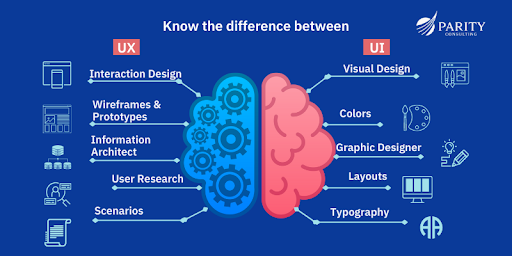
Before starting your journey toward becoming a UI/UX designer, it’s essential to understand how UX and UI work together to create successful digital products.
UX (User Experience)
UX focuses on how a product works and how users interact with it.
It includes:
- User research
- Information architecture
- User flows
- Wireframing
- Prototyping
- Usability testing
- Interaction logic
UX answers:
- Is this product easy to use?
- Does it solve the user’s problem?
- Is the experience smooth and logical?
UI (User Interface)
UI focuses on how the product communicates visually and guides interaction.
It includes:
- Typography systems
- Color systems
- Layout grids
- Component design (buttons, inputs, cards, modals)
- Design systems & consistency
- Micro interactions
- Visual feedback states (hover, active, error, success)
- Responsive design
UI answers:
- Is the interface clear and intuitive?
- Does the design guide user attention correctly?
- Is the visual hierarchy helping users make decisions?
- Does the product feel modern, trustworthy, and consistent?
In 2026: Most Companies Hire Hybrid Designers
While some companies hire pure UX or pure UI designers, most startups and tech companies prefer UI/UX designers who can handle both structure and visuals.
That’s why your learning roadmap must include both.
Why UI/UX Design Is One of the Best Careers in 2026

Every Company Is a Digital Company
Healthcare, fintech, education, e-commerce — every industry needs digital products.
Both UX and UI designers play critical roles: UX ensures the product works well for users, while UI makes it visually appealing and intuitive.
AI Enhances, But Cannot Replace Designers
AI can generate layouts or color schemes, but it cannot replace strategic thinking, empathy, and user-focused design decisions.
UX designers define user problems, experience flows, and usability improvements.
UI designers ensure visual consistency, brand alignment, accessibility, and micro-interactions that make the product engaging.
Strong Salary Potential
Entry-level UI/UX designers in the U.S. often start between $65,000–$85,000.
Mid-level designers can reach $90,000–$120,000+.
Senior product designers can exceed $140,000.
Companies value professionals who can blend UX and UI skills, which often commands higher salaries.
Remote and Global Opportunities
UI/UX design is highly remote-friendly. Both UX and UI skills are in demand worldwide, giving designers flexibility to work with international teams and products.
What Does a UI/UX Designer Actually Do?
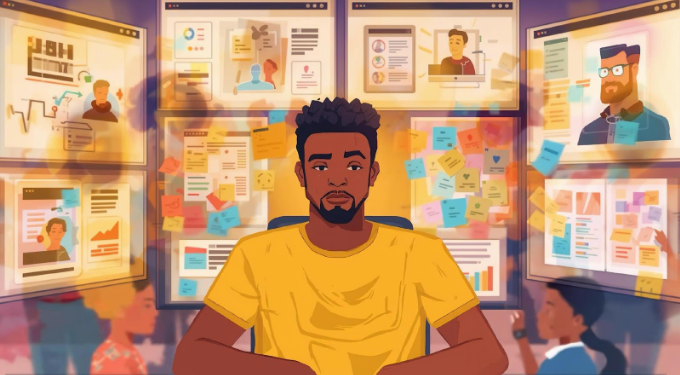
A UI/UX designer bridges the gap between how a product works (UX) and how it looks (UI). Their goal is to create digital experiences that are both functional and visually engaging. Here’s a typical workflow:
Step 1: User Research (UX)
Understanding your users is the foundation of good design. This step involves:
- Conducting interviews and surveys to learn user needs.
- Analyzing competitors to identify opportunities and gaps.
- Creating user personas to represent target audiences.
Why it matters: UX research ensures that both the functionality and interface decisions are grounded in real user behavior, avoiding assumptions that could harm the experience.
Step 2: Define the Problem (UX + UI Input)
- Map user journeys and identify pain points.
- Determine experience gaps that the product must solve.
- Consider UI implications: visual hierarchy, brand alignment, and accessibility requirements.
Why it matters: Clear problem definition helps ensure that both the structure (UX) and look (UI) of the product align with user needs.
Step 3: Wireframing (UX + UI Sketching)
- Create low-fidelity layouts to define the structure of screens.
- Include placement of key UI elements like buttons, menus, and forms.
Why it matters: Wireframes let designers experiment with layout and flow before investing time in detailed visuals. Even at this stage, UI considerations like spacing and hierarchy start influencing the design.
Step 4: Prototyping (UX + UI)
- Build interactive versions of the product to simulate real use.
- Incorporate UI elements like clickable buttons, transitions, and animations.
Why it matters: Prototypes allow testing both usability and visual appeal, ensuring that the product is intuitive and engaging before development.
Step 5: Visual Design (UI)
- Define color schemes, typography, icons, and buttons.
- Refine layout, spacing, and visual hierarchy.
- Ensure brand consistency and accessibility.
Why it matters: Even with perfect UX, a product that looks confusing or outdated can frustrate users. UI transforms functional flows into a polished, attractive experience.
Step 6: Usability Testing (UX + UI)
- Test the product with real users to identify friction points.
- Evaluate both interaction (UX) and visual clarity (UI).
- Iterate designs based on feedback, adjusting flows, layout, or visual elements.
Why it matters: Testing ensures the final product is easy to use, efficient, and visually appealing, creating a seamless experience for users.
Summary:
A UI/UX designer operates at the intersection of research, psychology, and visual design, blending functional problem-solving with aesthetics. Successful designers think strategically about both UX and UI, ensuring the product not only works but also delights users.
Step-by-Step UI/UX Roadmap for 2026
If you want to become a UI/UX designer, follow this structured roadmap that balances UX and UI at every step:
Phase 1: Learn UX Foundations
Start with understanding your users and the problems you’re solving:
- Design thinking
- User psychology
- Human-centered design
- Information architecture
- Usability principles
UI integration: Even in early UX learning, consider how interface patterns affect usability and perception. Early exposure to UI principles (like spacing, alignment, and typography) helps you design flows that will later look polished.
Tip: Avoid jumping straight into tools. Understanding users comes first.
Phase 2: Learn UI Fundamentals
Layer your visual design skills on top of UX knowledge:
- Typography and type systems
- Color theory and color accessibility
- Layout grids and spacing systems
- Visual hierarchy and component consistency
- Iconography and micro-interactions
UX integration: Always connect visuals to user needs and flows. Great UI supports UX, ensuring that the interface guides users intuitively.
Phase 3: Master Industry Tools
In 2026, focus on tools that bridge both UX and UI:
- Figma (design, prototyping, and collaboration)
- Prototyping tools for interactive flows
- Design systems and component libraries
- Collaboration and handoff tools with developers
Tip: Tools are easy to learn. Thinking critically about design problems is harder—prioritize mindset over software proficiency.
Phase 4: Build Real Projects
Your portfolio should reflect end-to-end skills:
- 3–5 full case studies solving real problems
- Clear documentation of UX research, flows, wireframes, UI design, and testing
- Highlight decisions in both interaction and visual design
Tip: Hiring managers care about your design thinking and the balance of UX/UI skills—not just pretty screens.
Phase 5: Build a Strong Portfolio
Each case study should clearly show:
- The problem and goals
- Your research and insights (UX)
- Wireframes and interaction flows
- Final visual UI design
- Results or improvements after testing
Tip: Avoid copying designs. Show how you integrate UX and UI thinking to solve real-world problems.
Phase 6: Apply Strategically
- Optimize LinkedIn and online portfolios to showcase UX and UI skills
- Prepare for both UX and UI interviews
- Practice whiteboard challenges and design critiques
- Network in design communities and contribute to design discussions
Tip: Consistency and clarity in demonstrating both UX and UI abilities matter more than perfection.
UI/UX Skills You Must Master in 2026
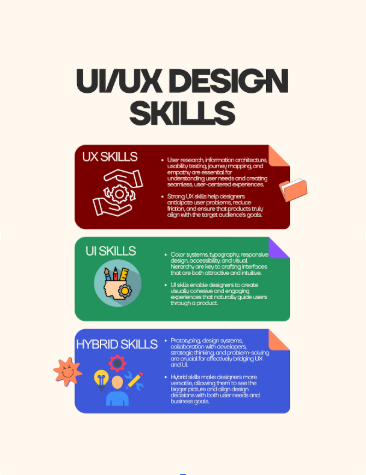
To become a job-ready UI/UX designer, you need to develop three layers of skills: UX, UI, and hybrid skills that connect the two. Mastering these ensures you can design products that are both usable and visually appealing.
UX Skills – Understanding the User
These skills focus on how a product works and how users interact with it:
- User research: Conduct interviews, surveys, and competitor analysis to uncover real user needs.
- Usability testing: Observe users interacting with your product to find friction points and improve flows.
- Interaction design: Plan how users navigate through screens, how actions are triggered, and how feedback is delivered.
- Information architecture: Organize content and features logically to make the product intuitive.
- Journey mapping: Visualize the user’s path to identify pain points and opportunities for improvement.
Why it matters: Strong UX skills ensure that your product solves real problems efficiently and delightfully, creating satisfied users.
UI Skills – Crafting the Visual Experience
These skills focus on how a product looks and feels:
- Typography systems: Choose fonts, sizes, and spacing to improve readability and hierarchy.
- Color systems: Use color purposefully for hierarchy, branding, and accessibility.
- Component libraries: Build reusable UI elements for consistency and efficiency.
- Responsive design: Ensure the product works on multiple devices and screen sizes.
- Accessibility standards: Make products usable for people with disabilities, ensuring inclusivity.
Why it matters: Even the best UX fails if the interface is confusing or unattractive. UI skills make your product visually coherent, engaging, and accessible.
Hybrid Skills – Bridging UX and UI
These skills combine research, strategy, and visual design to deliver end-to-end product solutions:
- Prototyping: Create interactive versions to test flows and visual design together.
- Design systems: Maintain consistency in components, patterns, and branding across the product.
- Collaboration with developers: Translate designs into functional products through clear communication and handoff.
- Product thinking: Understand business goals, user needs, and technical constraints to make strategic design decisions.
Why it matters: Hybrid skills are what make a designer strategic, versatile, and highly valuable to companies, especially in 2026 where many roles demand both UX and UI expertise.
Pro Tip: The best designers in 2026 aren’t just visual creators—they’re strategic thinkers who can balance function, aesthetics, and business goals in every product they touch.
Do You Need a Degree to Become a UI/UX Designer?
Short answer: No.
There are three main paths:
-
Traditional Degree
- 3–4 years
- Expensive
- Often outdated curriculum
-
Self-Taught
- Flexible
- Hard to stay consistent
- No mentorship
-
UI/UX Bootcamp
- 4–8 months
- Structured roadmap
- Mentorship
- Portfolio support
- Career guidance
For career switchers, structured programs often accelerate results significantly.
If you're looking for a guided path with real projects, mentorship, and job-focused outcomes, exploring a UI/UX bootcamp designed for career transition can dramatically shorten your timeline.
UI/UX Salary Expectations in 2026
Here’s a general breakdown:
- Junior UI/UX Designer: $65,000–$85,000
- Mid-Level Designer: $90,000–$120,000
- Senior / Product Designer: $130,000+
- Freelance Designers: Varies widely
Remote roles may offer location-adjusted salaries, but global hiring continues to expand.
https://www.salary.com/research/salary/standard/ux-ui-designer-salary?utm_source=chatgpt.com
Common Mistakes Beginners Make
Starting a career in UI/UX design can be exciting, but beginners often make avoidable mistakes that slow down their growth. Understanding these pitfalls helps you progress faster and more effectively.
1. Learning UI before UX
Many beginners jump straight into tools and visual design without first understanding user needs, flows, and research methods. This often results in interfaces that look good but don’t solve real problems.
Tip: Start with UX foundations first, then layer in UI skills. This ensures your designs are both functional and visually appealing.
2. Focusing Only on Tools
Tools like Figma, Adobe XD, or Sketch are important, but they cannot replace critical thinking, problem-solving, and design strategy. Beginners who focus only on software often struggle to create meaningful products.
Tip: Learn tools in parallel with design principles, not before them.
3. Skipping Research
Skipping user research and usability testing is a common trap. Without understanding real user behavior, assumptions drive design decisions, often leading to poor experiences or redesigns later.
Tip: Conduct interviews, surveys, and usability tests for every project, even small ones.
4. Not Building Case Studies
A portfolio without detailed case studies shows only finished screens, leaving hiring managers unsure about your thought process and problem-solving skills.
Tip: Document every project end-to-end: problem → research → wireframes → UI → testing → results.
5. Learning Without Feedback
Design is iterative, and feedback is essential. Beginners who work in isolation may repeat the same mistakes, slowing their growth.
Tip: Seek critiques from mentors, peers, or online communities. Apply feedback to improve continuously.
Fastest Growth Happens When You:
- Follow a structured UI/UX roadmap: Progress logically from research to visual design.
- Work on guided projects: Practice in real-world scenarios rather than only theoretical exercises.
- Receive expert feedback: Learn from experienced designers to avoid common pitfalls.
- Build a job-ready portfolio: Showcasing a mix of UX thinking and UI execution increases your chances of landing interviews and jobs.
Pro Tip: In 2026, companies are looking for hybrid designers who can balance UX strategy and UI execution. Avoiding these mistakes early helps you stand out and grow faster in a competitive market.
Ready to Become a UI/UX Designer in 2026?
By now, you understand:
- The difference between UI and UX
- The exact roadmap to follow
- The skills required
- The timeline
- The salary potential
The real question is: do you want to figure it out alone, or follow a proven system?
If you're serious about becoming a UI/UX designer and want:
- Structured curriculum
- Real-world projects
- Mentorship from industry professionals
- Portfolio support
- Career coaching
Then the AI-Enhanced UI/UX Design Bootcamp at Workforce Institute could be your fastest path into tech. This 24-week, 100% online program equips you to design smarter and faster while integrating cutting-edge AI tools like Figma plugins, ChatGPT, Uizard, and more. You’ll graduate with a job-ready portfolio, hands-on experience, and the confidence to launch your career in UI/UX design.
Start your journey today: Join the AI-Enhanced UI/UX Bootcamp
Your future in design doesn’t start when you feel ready—it starts when you decide to begin.